Sell Extensions by Saint for Lucera

Saint

Heir
Customer
Hi,

Here's a list of all extension I did for my own use, selling individually. This is all done by me, and me only, exclusively for Lucera data pack. All have been tested on live server using latest Lucera rev. Payments via PayPal only to oasisl2server@gmail.com, firends and familly. Post your question in the thread. I will not provide support for setting up your own discord bots on the discord dev portal. I will only provide support to extensions in general, all of them are plug and play where you put *.ext.jar into gameserver folder and *.properties file into config folder and that's it, configuration files are commented as much as possible so you won't get lost.

READ AND ASK QUESTIONS IF NEEDED BEFORE PURCHASE, THERE WILL BE NO REFUNDS
These extensions were developed and are maintained specifically for the Lucera Classic Datapack and p166 Fafurion Client. Support is provided exclusively for these configurations, and purchases are made at your own discretion.


Chance Notify Extension - $10
Outputs system message for all chance based skills and debuffs. Config below:
Code:
# Chance Notify Extension Configuration
# =====================================
# Enable/disable the entire extension
ChanceNotifyEnabled = True
# Enable/disable specific notification types
NotifyDebuffChance = True
NotifySkillChance = True
# Only notify players (not NPCs/monsters)
NotifyOnlyPlayers = True
# Only notify for offensive skills
NotifyOnlyOffensiveSkills = True
# Message format settings
MessagePrefix = [+]
ShowBaseChance = False
ShowCalculatedChance = True
ShowSkillName = True

Enhanced Boss Status - $25
Custom made .boss command (command can be specified according to your needs) with custom made %list% for better readability than stick Lucera .rb. Allows to view categorized raid bosses by level instead of one full list.
Code:
# Enhanced Raid Boss Status Extension Configuration
# ================================================

# Enable/Disable the enhanced raid boss status service
EnhancedRaidBossStatusEnable = true

# Number of bosses to display per page
EnhancedRaidBossStatusBossesPerPage = 20

# Level ranges for quick access buttons (6 ranges, 10 levels each)
EnhancedRaidBossStatusLevelRange1 = 20-30
EnhancedRaidBossStatusLevelRange2 = 31-40
EnhancedRaidBossStatusLevelRange3 = 41-50
EnhancedRaidBossStatusLevelRange4 = 51-60
EnhancedRaidBossStatusLevelRange5 = 61-70
EnhancedRaidBossStatusLevelRange6 = 71-80

# Voiced commands for accessing the service
EnhancedRaidBossStatusCommands = .boss,.rb

# Enable pagination
EnhancedRaidBossStatusEnablePagination = true


# Spacing configuration for boss list entries
# ==========================================

# Top spacing for first boss entry (in pixels) - prevents top clipping
EnhancedRaidBossStatusTopSpacing = 24

# Bottom spacing for last boss entry (in pixels) - prevents bottom clipping
EnhancedRaidBossStatusBottomSpacing = 24

# Spacing between boss entries (in pixels)
EnhancedRaidBossStatusEntrySpacing = 12

Boss Announcement with Discord Notifications - $10
Outputs announcement messages both in game as well as into specified discord channel.
Code:
# Boss Announcement Extension Configuration
# ======================================

# Enable/disable the boss announcement extension
BossAnnouncementEnabled = True

# Discord Bot Configuration
# ========================
# Enable/disable Discord bot integration
DiscordBotEnabled = True

# Your Discord Bot Token (get from Discord Developer Portal)
# IMPORTANT: Replace this with a valid token from Discord Developer Portal
# Go to https://discord.com/developers/applications -> Your App -> Bot -> Reset Token
DiscordBotToken =

# Discord Channel ID for boss announcements (right-click channel -> Copy ID)
DiscordChannelBoss =

# Boss Filtering
# ==============
# Minimum boss level to announce (bosses below this level will be ignored)
MinBossLevel = 70

# Announcement Settings
# ====================
# Announce when boss is first attacked
AnnounceAttackStart = True


# Announce when boss is defeated
AnnounceDeath = True

# Output Settings
# ===============
# Enable in-game announcements
# Disable in-game announcements due to in-game announcements handdled by Giranforg extension
InGameAnnouncements = False

# Enable Discord announcements
DiscordAnnouncements = False

# Distance from RaidBoss where a player should receive the announcement
# If set to -1, the announcement will be shown to all players online
DistanceToAnnounce=-1

# Message prefix for announcements
MessagePrefix =

# Discord Embed Settings
# =====================
# Enable Discord embed messages (richer formatting)
EnableEmbedMessages = True

# Embed colors (hex format)
EmbedColorAttack = 0xFF6B35
EmbedColorDeath = 0xFF0000

# Advanced Settings
# ================
# Log level for debugging (DEBUG, INFO, WARN, ERROR)
LogLevel = INFO

# Example Configuration:
# ====================
# BossAnnouncementEnabled = True
# DiscordBotEnabled = True
# DiscordBotToken =
# DiscordChannelBoss =
# MinBossLevel = 75
# AnnounceAttackStart = True
# AnnounceDeath = True
# InGameAnnouncements = True
# DiscordAnnouncements = True
# MessagePrefix =
# EnableEmbedMessages = True
# EmbedColorAttack = 0xFF6B35
# EmbedColorDeath = 0xFF0000
63ccoKp.png


Discord Chat Bot/Discord Admin Commands Bot - $50
Two way comunication between in-game chat and discord chat, communicate with your players without logging in and let them read in game chat via discord. Additionaly bot integrations allows to run GM Commands via specified discord channels and specified discord user id. In game messages appears as if they were sent by player, takes in discord server profile user name as input name for in-game chat.
Code:
# Discord Bot Extension Configuration for L2J Oasis Server
# =============================================================

# Enable/disable the Discord bot extension
DiscordBotEnabled = True

# Discord Bot Token (get from Discord Developer Portal)
# https://discord.com/developers/applications
DiscordBotToken =

# =============================================================
# Discord Channel Configuration
# =============================================================
# How to get Channel IDs:
# 1. Enable Developer Mode in Discord (User Settings > Advanced > Developer Mode)
# 2. Right-click on a channel and select "Copy Channel ID"
# 3. Replace with your actual channel IDs

# Trade chat channel ID (for TRADE chat)
DiscordChannelTrade =

# Shout chat channel ID (for SHOUT chat)
# NOTE: All Discord messages will be sent to SHOUT in game
DiscordChannelShout =

# Hero chat channel ID (for HERO_VOICE chat)
DiscordChannelHero =

# Admin channel IDs (for GM commands and announcements)
# Format: comma-separated list of Discord channel IDs
# Example: DiscordChannelAdmin =
# You can add multiple channels separated by commas
DiscordChannelAdmin =

# =============================================================
# Channel Bridging Settings (Simplified)
# =============================================================
# Only these channels will be bridged from game to Discord
BridgeTradeChat = True
BridgeShoutChat = True
BridgeHeroChat = True

# All other channels are disabled
BridgeGeneralChat = False
BridgeWorldChat = False

# =============================================================
# Communication Settings
# =============================================================
# Enable Discord to game chat (all messages go to SHOUT channel)
EnableDiscordToGame = True

# Enable game to Discord chat (only TRADE/SHOUT/HERO)
EnableGameToDiscord = True

# Force all Discord messages to SHOUT channel in game
ForceDiscordToShout = True

# =============================================================
# Bot Settings
# =============================================================
# Command prefix for Discord bot commands
CommandPrefix = !

# Bot presence settings
BotStatus = Oasis Interlude+
BotActivity = WATCHING


# =============================================================
# Security & Filtering
# =============================================================
# Enable profanity filter
EnableProfanityFilter = True

# Maximum message length (characters)
MaxMessageLength = 500

# Rate limiting (messages per minute per Discord user)
RateLimitPerMinute = 10

# =============================================================
# Logging Settings
# =============================================================
# Enable logging of chat messages
LogChatMessages = True

# =============================================================
# Database Configuration for Item Lookup
# =============================================================
# Enable database item lookup for detailed item information
EnableItemDatabaseLookup = True

# Database connection settings
DatabaseHost = localhost
DatabaseName =
DatabaseUser = admin
DatabasePassword =
DatabasePort = 3306

# =============================================================
# NEW: Discord Command System Configuration
# =============================================================
# Enable the Discord command system (admin commands)
DiscordCommandSystemEnabled = True

# =============================================================
# Authorization Settings
# =============================================================
# Authorized Discord user IDs who can use admin commands
# Format: comma-separated list of Discord user IDs
# To get your Discord user ID: Enable Developer Mode, right-click your name, "Copy User ID"
# Leave empty to allow all users (NOT RECOMMENDED for production)
DiscordAuthorizedUsers =

# =============================================================
# Command Settings
# =============================================================
# Command cooldown in milliseconds (default: 1000ms = 1 second)
DiscordCommandCooldown = 1000

# Enable command logging
DiscordCommandLogging = True

# =============================================================
# Monitoring Settings
# =============================================================
# Enable system monitoring (CPU/Memory usage alerts)
DiscordMonitoringEnabled = True

# Memory usage threshold for alerts (percentage, default: 80%)
DiscordMemoryThreshold = 80

# CPU usage threshold for alerts (percentage, default: 80%)
DiscordCpuThreshold = 80

# Monitoring check interval in minutes (default: 5 minutes)
DiscordMonitoringInterval = 5

# =============================================================
# Debug Settings
# =============================================================
# Enable debug mode for command system
DiscordDebugMode = True

# Log all incoming Discord messages
DiscordLogAllMessages = False

# =============================================================
# Supported Channels (READ ONLY - DO NOT MODIFY)
# =============================================================
# FROM GAME TO DISCORD: TRADE, SHOUT, HERO_VOICE only
# FROM DISCORD TO GAME: All messages → SHOUT channel

# =============================================================
# NEW: Embed Image Configuration for Command Categories
# =============================================================
# Configure different embed images for different command categories
# These images will be displayed in Discord embeds when commands are executed

# =============================================================
# Bans/Punishments Category (kick, chatban, ban, jail commands)
# =============================================================
EmbedImageBansPunishments = https://i.imgur.com/6vrPymy.png

# =============================================================
# Maintenance Category (status, restart, shutdown commands)
# =============================================================
EmbedImageMaintenance = https://i.imgur.com/PHYQQsS.png

# =============================================================
# Player Management Category (give_all, give_item, setlevel commands)
# =============================================================
EmbedImagePlayerManagement = https://i.imgur.com/GNZkpqo.png

# =============================================================
# Server Info Category (help, online, uptime, version commands)
# =============================================================
EmbedImageServerInfo = https://i.imgur.com/LAsUKut.png

# =============================================================
# Moderation Category (announce, gm commands)
# =============================================================
EmbedImageModeration = https://i.imgur.com/XDbD4UT.png

# =============================================================
# Default Embed Image (fallback for uncategorized commands)
# =============================================================
EmbedImageDefault = https://i.imgur.com/KDuE4tj.png

# =============================================================
# Embed Configuration
# =============================================================
# Enable embed images in command responses
EnableEmbedImages = True

# Default embed color (hex format, e.g., #FF0000 for red)
DefaultEmbedColor = #0099FF

# Embed colors for different categories (hex format)
EmbedColorBansPunishments = #FF0000
EmbedColorMaintenance = #FFA500
EmbedColorPlayerManagement = #00FF00
EmbedColorServerInfo = #0099FF
EmbedColorModeration = #FFD700
fcHT0jb.png
A6JwzSq.png


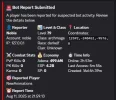
Bot Report with Discord Notifications- $10
Extension allowing players to run .report command that triggers captcha on targeted player and send detailed report to specified discord channel.
Code:
# Bot Report System Configuration
# Discord Webhook Settings
DiscordEnabled = true
DiscordWebhook =

# File Logging Settings
FileLoggingEnabled = true
LogFilePath = log/bot-reports.txt

# Report Cooldown (in seconds) - prevent spam
ReportCooldown = 300

# Maximum reports per player per day
MaxReportsPerDay = 10

# Enable detailed logging
VerboseLogging = true

# Captcha Integration Settings
# Enable captcha check when players are reported (works even if main bot check service is disabled)
CaptchaEnabled = true
# Maximum captcha checks per day for the same target player
CaptchaMaxPerTargetPerDay = 3
# Cooldown between captcha checks for the same target (in seconds)
CaptchaTargetCooldown = 1800

# Report Restrictions
# Minimum level required to use .report command
MinLevelToReport = 20
# Disable .report command in peace zones (cities, villages, etc.)
DisableReportInPeaceZones = true
1755062194484.webp

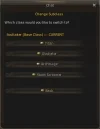
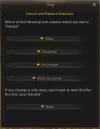
Subclass Command - $10
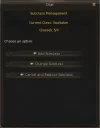
Allows players to run .sub command and opens up custom subclass management window, extension takes into account server configs for max subclass and show subclass list for classes.
Code:
# Subclass Extension Configuration

# Enable/Disable the extension
Enabled = true

# Command to open subclass window (without the dot)
Command = sub

# Minimum level required to use the command
MinLevel = 1

# Allow usage in peace zones (cities, villages, etc.)
AllowInPeaceZones = true

# Allow usage during combat
AllowInCombat = false

# Allow usage during Olympiad
AllowInOlympiad = false

# Allow usage during Duel
AllowInDuel = false

# Enable detailed logging
VerboseLogging = true

# Custom messages
Message_NoPermission = You don't have permission to use this command.
Message_TooLowLevel = You must be at least level %d to use this command.
Message_InCombat = You cannot use this command while in combat.
Message_InOlympiad = You cannot use this command during Olympiad.
Message_InDuel = You cannot use this command during a duel.
Message_NotInPeaceZone = You can only use this command in peace zones.
1755062466986.webp1755062480677.webp1755062491342.webp
 

Attachments

  • 1755290717004.webp
    1755290717004.webp
    21.5 KB · Views: 53
Last edited:
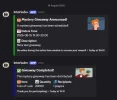
Giveaway Scheduler with Discord Notifications- $30
Extension allows to run a command in discord channel to schedule a giveaway of a given item and its quantity. Reports info about time and date, and reports back when giveaway is delivered. Delivers by IP to players. Adds new tables into database and works alongside it.
Code:
# =============================================================================
# Giveaway Extension Configuration
# =============================================================================
# Configuration file for the Discord-integrated giveaway system
# =============================================================================
# DISCORD COMMANDS REFERENCE
# =============================================================================
# This section documents all available Discord commands for the giveaway system
# Commands must be used in authorized channels by authorized users (see config below)
#
# ===== GIVEAWAY CREATION =====
# //giveaway create <item_id> <count> "<datetime>" "<description>"
#
# Creates a new scheduled giveaway with the specified parameters
#
# Parameters:
#   - item_id: Numeric ID of the item to give away (e.g., 57 for Adena)
#   - count: Quantity of items to distribute
#   - datetime: When to execute the giveaway (in quotes)
#   - description: Human-readable description of the giveaway (in quotes)
#
# Datetime Formats:
#   1. Exact Time: "YYYY-MM-DD HH:MM"
#      Example: "2025-08-15 20:00" - executes exactly at 8:00 PM
#
#   2. Time Range: "YYYY-MM-DD HH:MM-HH:MM" 
#      Example: "2025-08-15 19:00-20:00" - executes at random time between 7-8 PM
#
# Examples:
#   //giveaway create 57 1000 "2025-08-15 20:00" "Evening Adena giveaway"
#   //giveaway create 1458 50 "2025-08-15 19:00-20:00" "Mystery scroll giveaway"
#   //giveaway create 4037 10 "2025-12-25 12:00-14:00" "Christmas coin surprise"
#
# ===== GIVEAWAY MANAGEMENT =====
# //giveaway list
#
# Shows all pending (not yet executed) giveaways
# Displays: ID, Item, Count, Scheduled Time, Description, Creator
#
# Example output:
#    Pending Giveaways (2 found)
#    ID: 5 | Item: 57 x1000 | Time: 2025-08-15 20:00 | Evening Adena giveaway
#    ID: 6 | Item: 1458 x50 | Time: 2025-08-15 19:23 | Mystery scroll giveaway
#
# //giveaway cancel <giveaway_id>
#
# Cancels a pending giveaway by its ID (from //giveaway list)
# Only works on PENDING giveaways, not completed ones
#
# Examples:
#   //giveaway cancel 5
#   //giveaway cancel 6
#
# ===== GIVEAWAY STATUS =====
# //giveaway status
#
# Shows system status and statistics
# Displays: Extension status, pending giveaways count, total created, etc.
#
# ===== HELP COMMAND =====
# //giveaway help
#
# Shows command usage and examples (same as this reference)
#
# =============================================================================
# GIVEAWAY BEHAVIOR NOTES
# =============================================================================
# 
# IP-Based Distribution:
#   - Only ONE reward per unique IP address to prevent multi-client abuse
#   - Players must be online when the giveaway executes
#   - Items are added directly to player inventory
#   - In-game message sent to each recipient
#
# Scheduling:
#   - All times are server local time
#   - Giveaways are checked every minute (configurable)
#   - Random time ranges provide suspense for players
#   - Past times are rejected with error message
#
# Discord Notifications:
#   - Announcement sent when giveaway is created (mystery item)
#   - Completion notification sent after execution (reveals item and count)
#   - Error notifications for failed giveaways
#
# Database Storage:
#   - All giveaways stored in database with full audit trail
#   - Tracks creator, creation time, execution time, recipient count
#   - Status tracking: PENDING -> ACTIVE -> COMPLETED/CANCELLED
#
# Authorization:
#   - Commands restricted to configured admin channels
#   - User authorization based on Discord User IDs
#   - Independent from main Discord bot permissions
#
# =============================================================================
# General Settings
# =============================================================================
# Enable/disable the giveaway extension
GiveawayEnabled = True
# Debug mode - enables detailed logging
GiveawayDebugMode = False
# =============================================================================
# Scheduler Settings  
# =============================================================================
# How often to check for pending giveaways (in minutes)
# Default: 1 minute
GiveawaySchedulerInterval = 1
# Maximum number of concurrent giveaway executions
# Default: 2
GiveawayMaxConcurrentExecutions = 2
# =============================================================================
# Discord Bot Configuration
# =============================================================================
# Enable Discord bot integration for giveaways
# Set to False to disable Discord integration (giveaways will still work without Discord)
GiveawayDiscordEnabled = True
# Discord Bot Token for giveaway bot
# Get this from https://discord.com/developers/applications
# Leave empty to use the main server's Discord bot (from discordbot.properties)
# Or provide a separate bot token for giveaway-only bot
GiveawayDiscordBotToken = MTM5NzEyNzgxMzkzMjM4ODM4Ng.GxL2hg.56km-WRtf4UV67cZzA6IDiusQqI93DPi1TDU5c
# Sample command
# //giveaway create "Test Reward" 57 10 "2025-08-14 23:45" "Testing IP-based distribution"
# =============================================================================
# Discord Channel Configuration
# =============================================================================
# Channel ID for giveaway announcements
# Get this by right-clicking a Discord channel -> Copy ID (with Developer Mode enabled)
GiveawayAnnouncementChannelId = 1401832936432734208
# Admin channel IDs where giveaway commands can be used (comma-separated)
# Leave empty to use channels from main Discord bot config
GiveawayAdminChannels = 1401832936432734208
# =============================================================================
# Discord Authorization
# =============================================================================
# Authorized Discord user IDs who can create giveaways (comma-separated)
# Get your Discord user ID: Enable Developer Mode, right-click your name, "Copy User ID"
# Leave empty to use authorization from main Discord bot config
GiveawayAuthorizedUsers = 159410031937191936
# =============================================================================
# Discord Bot Settings
# =============================================================================
# Bot status message
GiveawayBotStatus = 
# Bot activity type (PLAYING, WATCHING, LISTENING, STREAMING)
GiveawayBotActivity = Managing Giveaways 
# =============================================================================
# Discord Announcement Settings
# =============================================================================
# Enable giveaway announcements when created
GiveawayAnnounceCreation = True
# Enable completion announcements when giveaway is distributed
GiveawayAnnounceCompletion = True
# Embed color for giveaway announcements (hex color code)
GiveawayEmbedColor = #77FF6B
# Custom embed images for giveaway announcements
GiveawayEmbedImageCreated = https://i.imgur.com/pCWE45B.png
GiveawayEmbedImageCompleted = https://i.imgur.com/TV8gxyV.png
# =============================================================================
# Distribution Settings
# =============================================================================
# Maximum number of items that can be given in a single giveaway
# This prevents accidental massive distributions
GiveawayMaxItemCount = 1000000
# Minimum time in advance a giveaway must be scheduled (in minutes)
# This prevents creating giveaways for immediate execution
GiveawayMinAdvanceTime = 5
# Maximum time in advance a giveaway can be scheduled (in days)
# This prevents scheduling giveaways too far in the future
GiveawayMaxAdvanceTime = 30
# =============================================================================
# Security Settings
# =============================================================================
# List of item IDs that cannot be given through giveaways (comma-separated)
# Example: 6673,6674,6675 (blocks certain quest items)
GiveawayBlockedItems = 
# Minimum player level to receive giveaway rewards
# Set to 0 to disable level requirement
GiveawayMinPlayerLevel = 1
# Require players to be in a clan to receive rewards
GiveawayRequireClan = False
# Maximum number of giveaways a single Discord user can create per day
GiveawayMaxPerUserPerDay = 10
# =============================================================================
# Database Settings
# =============================================================================
# Enable automatic cleanup of old completed giveaways
GiveawayAutoCleanup = True
# How many days to keep completed giveaway records before cleanup
# Set to 0 to disable automatic cleanup
GiveawayCleanupDays = 30
# Enable recipient tracking (stores who received rewards)
GiveawayTrackRecipients = True
# =============================================================================
# Notification Settings
# =============================================================================
# Enable in-game announcements when giveaways are distributed
GiveawayInGameAnnounce = True
# In-game announcement message template
# Available variables: {item_name}, {item_count}, {recipients}
GiveawayInGameMessage = A giveaway has been distributed! {recipients} players received {item_name} x{item_count}!
# Enable system messages to players when they receive giveaway items
GiveawayPlayerMessage = True
# Player message template
# Available variables: {item_name}, {item_count}, {description}
GiveawayPlayerMessageTemplate = You have received a giveaway reward: {item_name} x{item_count}! Check your inventory.
# =============================================================================
# Advanced Settings
# =============================================================================
# Thread pool size for giveaway processing
GiveawayThreadPoolSize = 2
# Connection timeout for database operations (in seconds)
GiveawayDatabaseTimeout = 30
# Enable performance monitoring and statistics
GiveawayEnableStats = True
# Log detailed distribution statistics
GiveawayLogStats = True
 
Hero Item Extension - $20
Allows to have on use item that will grant Hero status with all of its benefits for a specified amount of time with optional flag to clear hero status from item on server restart.
Code:
# =============================================================================
# Hero Item Extension Configuration
# =============================================================================
# This file contains essential configuration settings for the hero item extension
# Copy this file to gameserver/config/hero-item.properties and modify as needed

# =============================================================================
# Essential Hero Item Configuration
# =============================================================================

# Item ID that will grant hero status when used
# IMPORTANT: This item must exist in gameserver/data/items/71700-71799.xml
# The item XML must include: <set name="handler" value="handler.items.HeroItemHandler" />
HeroItemId = 71701

# Duration in seconds that hero status will last
# Default: 3600 seconds (1 hour)
HeroDurationSeconds = 3600

# Whether to clear hero status on server restart
# If True: All hero status entries will be removed from database on server shutdown
# If False: Hero status will persist across server restarts
ClearHeroOnRestart = True
 

Drop Extension - $50​

What It Does:​

A custom Java extension for Lucera 2 servers that automatically drops special items when players kill monsters, with configurable drop rates, daily limits, and database tracking. Single class, 15kb *.jar.

Core Features:​

Smart Drop System​

  • Mobs: Configurable level ranges (e.g., 61-75) with custom drop chances and daily limits
  • Raid Bosses: Level-based detection with separate item IDs and drop rates
  • Epic Bosses: Specific NPC ID detection with guaranteed drops

Configuration Options​

  • Item IDs: Different items for mobs vs bosses (e.g., Apiga for mobs, Golden Apiga for bosses)
  • Drop Chances: 0-100% configurable per monster type
  • Daily Limits: Separate daily allocation caps per monster type
  • Total Caps: Server-wide maximum drops per item type

Database Integration​

  • Automatic Table Creation: Creates drop_extension_logs and drop_extension_logs_settings
  • Real-time Tracking: Counts daily and total drops with persistence across server restarts
  • Compact Logging: Optional detailed logging vs. daily summaries

Smart Scheduling​

  • Daily Reset: Configurable reset time (e.g., midnight server time)
  • Automatic Cleanup: Prevents table bloat with maintenance options

In-Game Experience​

  • Custom Messages: Configurable drop notifications
  • Thread-safe: Handles multiple players simultaneously
  • Seamless Integration: Works with existing Lucera framework

Use Cases:​

  • Event Systems: Temporary item drop events
  • Economy Control: Limited daily item distribution
  • Player Rewards: Different rewards for different monster types
  • Server Balance: Controlled item inflation
Bottom Line: A flexible, database-backed drop system that gives server admins complete control over when, where, and how often special items drop in their Lucera based server.

Code:
# ============================================================================
# ENHANCED DROP EXTENSION - CONFIGURATION FILE
# ============================================================================
#
# This extension provides a flexible drop system with separate configurations
# for normal mobs, raid bosses, and epic bosses. Each type can have different
# items, drop chances, quantities, and daily/total allocation limits.
#
# FEATURES:
# - Separate item configurations for mobs, raid bosses, and epic bosses
# - Configurable drop chances (0.0% - 100.0%)
# - Configurable drop quantities per kill
# - Daily allocation limits that reset at configurable time
# - Total allocation caps that persist across server restarts
# - Automatic boss detection (level-based for raid bosses, NPC ID for epic bosses)
# - Database logging with compact daily summaries
# - Customizable drop messages
# - Automatic timezone detection
#
# ============================================================================
# QUICK START GUIDE
# ============================================================================
#
# 1. Set your item IDs (MobItemId, RaidBossItemId, EpicBossItemId)
# 2. Set your drop chances (MobDropChance, RaidBossDropChance, EpicBossDropChance)
# 3. Set your daily allocations (MobDailyAllocation, RaidBossDailyAllocation, EpicBossDailyAllocation)
# 4. Set your total caps (MobTotalAllocationCap, RaidBossTotalAllocationCap, EpicBossTotalAllocationCap)
# 5. Set your drop quantities (MobDropQuantity, RaidBossDropQuantity, EpicBossDropQuantity)
# 6. Configure your daily reset time (DailyResetHour, DailyResetMinute)
# 7. Set your boss detection ranges (RaidBossLevelMin, RaidBossLevelMax)
# 8. Set your epic boss NPC IDs (EpicBossIds)
#
# ============================================================================
# ITEM CONFIGURATION
# ============================================================================

# ============================================================================
# NORMAL MOB DROPS
# ============================================================================
# Mobs between levels 61-75 will drop these items

# Item ID for normal mobs (e.g., 9142 for Apiga)
MobItemId=9142

# Display name for the item (shown in game messages)
MobItemName=Apiga

# Drop chance percentage (0.0 = never, 100.0 = always)
MobDropChance=100.0

# How many items drop per mob kill
MobDropQuantity=1

# Level range for mob drops (inclusive)
MobLevelMin=61
MobLevelMax=75

# Daily limit - maximum items that can drop from mobs per day
MobDailyAllocation=5000

# Total limit - maximum items that can drop from mobs ever (persists across restarts)
MobTotalAllocationCap=10000

# ============================================================================
# RAID BOSS DROPS
# ============================================================================
# Monsters level 76-85 will automatically be detected as raid bosses

# Item ID for raid bosses (e.g., 9143 for Golden Apiga)
RaidBossItemId=9143

# Display name for the item
RaidBossItemName=Golden Apiga

# Drop chance percentage
RaidBossDropChance=100.0

# How many items drop per raid boss kill
RaidBossDropQuantity=1

# Daily limit for raid boss drops
RaidBossDailyAllocation=1000

# Total limit for raid boss drops (persists across restarts)
RaidBossTotalAllocationCap=5000

# ============================================================================
# EPIC BOSS DROPS
# ============================================================================
# Specific NPC IDs are used for epic boss detection

# Item ID for epic bosses
EpicBossItemId=9143

# Display name for the item
EpicBossItemName=Golden Apiga

# Drop chance percentage
EpicBossDropChance=100.0

# How many items drop per epic boss kill
EpicBossDropQuantity=1

# Daily limit for epic boss drops
EpicBossDailyAllocation=5000

# Total limit for epic boss drops (persists across restarts)
EpicBossTotalAllocationCap=10000

# ============================================================================
# BOSS DETECTION SETTINGS
# ============================================================================

# RAID BOSS DETECTION
# Monsters within this level range are automatically detected as raid bosses
RaidBossLevelMin=76
RaidBossLevelMax=85

# EPIC BOSS DETECTION
# These specific NPC IDs are treated as epic bosses
# Current list: Zaken, Orfen, Core, Ant Queen, Valakas, Antharas, Baium, Sailren, Frintezza
EpicBossIds=29019,29014,29006,29001,29028,29066,29020,29096,29047

# ============================================================================
# DAILY RESET CONFIGURATION
# ============================================================================
# Daily allocation limits reset at this time (in your server's timezone)

# Hour for daily reset (24-hour format: 0-23)
# 0 = midnight, 12 = noon, 23 = 11 PM
DailyResetHour=0

# Minute for daily reset (0-59)
DailyResetMinute=0

# Note: Timezone is automatically detected from your server

# ============================================================================
# DATABASE SETTINGS
# ============================================================================

# Enable database tracking (required for daily/total limits)
EnableDatabaseTracking=true

# Database table name for drop logs
DatabaseTableName=drop_extension_logs

# Log every individual drop (can make table very large - not recommended)
DatabaseLogEveryDrop=false

# Log daily summaries when counters reset (recommended)
DatabaseLogDailySummaries=true

# ============================================================================
# MESSAGE CUSTOMIZATION
# ============================================================================

# Custom message format for drop notifications
# Available placeholders:
# {quantity} - Number of items dropped
# {itemName} - Name of the item dropped
DropMessageFormat=You have earned {quantity} {itemName}(s).

# ============================================================================
# ADVANCED SETTINGS
# ============================================================================

# Enable debug logging for troubleshooting
EnableDebugLogging=true

# ============================================================================
# CONFIGURATION EXAMPLES
# ============================================================================
#
# EXAMPLE 1: High-rate server with lots of drops
# MobDropChance=25.0
# RaidBossDropChance=75.0
# EpicBossDropChance=100.0
# MobDailyAllocation=10000
# RaidBossDailyAllocation=5000
# EpicBossDailyAllocation=10000
#
# EXAMPLE 2: Low-rate server with rare drops
# MobDropChance=5.0
# RaidBossDropChance=25.0
# EpicBossDropChance=50.0
# MobDailyAllocation=1000
# RaidBossDailyAllocation=500
# EpicBossDailyAllocation=1000
#
# EXAMPLE 3: Different items for different boss types
# MobItemId=9142          # Apiga for mobs
# RaidBossItemId=9143     # Golden Apiga for raid bosses
# EpicBossItemId=9144     # Special item for epic bosses
#
# EXAMPLE 4: Different quantities for different sources
# MobDropQuantity=1        # 1 item per mob kill
# RaidBossDropQuantity=3   # 3 items per raid boss kill
# EpicBossDropQuantity=5   # 5 items per epic boss kill
#
# EXAMPLE 5: Different level ranges
# MobLevelMin=70           # Mobs level 70+
# MobLevelMax=85           # Mobs level 85 and below
# RaidBossLevelMin=80      # Raid bosses level 80+
# RaidBossLevelMax=90      # Raid bosses level 90 and below
#
# ============================================================================
# TROUBLESHOOTING
# ============================================================================
#
# PROBLEM: Items not dropping
# SOLUTION: Check drop chances are > 0.0, daily allocations not reached, total caps not reached
#
# PROBLEM: Wrong items dropping
# SOLUTION: Verify MobItemId, RaidBossItemId, and EpicBossItemId are correct
#
# PROBLEM: Bosses not detected correctly
# SOLUTION: Check RaidBossLevelMin/Max and EpicBossIds are set correctly
#
# PROBLEM: Daily limits not resetting
# SOLUTION: Verify DailyResetHour and DailyResetMinute are set correctly
#
# PROBLEM: Database errors
# SOLUTION: Ensure EnableDatabaseTracking=true and database connection is working
#
# ============================================================================
# IMPORTANT NOTES
# ============================================================================
#
# - All drop chances are percentages (0.0 - 100.0)
# - Daily limits reset automatically at the configured time
# - Total allocation caps persist across server restarts
# - Boss detection is automatic based on level ranges and NPC IDs
# - Database tables are created automatically on first launch
# - Compact logging prevents database table bloat
# - Timezone is automatically detected from your server
# - All counters are thread-safe and persistent
#
# ============================================================================
# SUPPORT
# ============================================================================
#
# This extension is designed to be self-contained and easy to configure.
# All settings are documented above with examples and troubleshooting tips.
# The extension will log important information to help diagnose any issues.
#
# ============================================================================
 
Weekend Rate Events - $50

What is it?​

A professional Lucera server extension that automatically manages weekend events and special holiday celebrations with configurable rate multipliers for XP, SP, Drop, and Spoil rates.

Key Features:​

  • Automatic Weekend Rotation - XP/SP, Drop, and Spoil events rotate automatically every weekend
  • Special Holiday Events - Christmas, Halloween, Valentine's Day, Easter, New Year with custom dates
  • Configurable Multipliers - Set your own rate bonuses via XML (default 1.5x)
  • Seamless Integration - Uses Java Reflection to modify server rates without source code changes
  • Player Notifications - Automatic in-game announcements and welcome messages
  • Database Logging - Track all events and player interactions
  • Debug Mode - Test events immediately without waiting for schedules
Code:
# Weekend Rate Events Configuration
# =================================
#
# IMPORTANT: This extension requires the following entries in gameserver/data/string/strings_en.properties:
#
# scripts.events.WeekendRateEvents.WelcomeMessage=Welcome! XP/SP Bonus Weekend is currently active!
# scripts.events.WeekendRateEvents.CurrentRates=Current rates: XP/SP: x{0}
# scripts.events.WeekendRateEvents.WelcomeMessageDrop=Welcome! Drop Bonus Weekend is currently active!
# scripts.events.WeekendRateEvents.CurrentRatesDrop=Current rates: Drop: x{0}
# scripts.events.WeekendRateEvents.WelcomeMessageSpoil=Welcome! Spoil Bonus Weekend is currently active!
# scripts.events.WeekendRateEvents.CurrentRatesSpoil=Current rates: Spoil: x{0}
# scripts.events.WeekendRateEvents.EventStarted=Weekend Rate Event has started! {0}
# scripts.events.WeekendRateEvents.EventEnded=Weekend Rate Event has ended! Rates returned to normal.
#
# These entries are already present in your strings_en.properties file, so the extension should work correctly.
# If you want to customize the messages, you can modify these entries in strings_en.properties.
# =================================

# Enable/Disable the extension
# Set to false to completely disable the weekend rate events system
# Example: WeekendRateEvents.Enabled=false (disabled) or true (enabled)
WeekendRateEvents.Enabled=true

# Configuration File
# The extension now uses XML configuration for flexible scheduling
# Edit weekend_events_schedule.xml to configure weekend rotation and special events
WeekendRateEvents.ConfigFile=weekend_events_schedule.xml

# Database and logging
# DatabaseEnabled: Store event history and player participation in database
# LogEvents: Record event start/stop times and rate changes in server logs
# Example: Both true = Full tracking of all weekend events and rate modifications
WeekendRateEvents.DatabaseEnabled=true
WeekendRateEvents.LogEvents=true

# Debug and testing options
# These settings are for testing and development - NOT for production use!
# DebugMode: Enable debug features (bypass schedule, custom event types, etc.)
# DebugBypassSchedule: Skip normal weekend timing and start events immediately
# DebugEventDurationMinutes: How long test events run (in minutes)
# DebugEventType: Which event type to test (XP_SP, DROP, or SPOIL)
# Example: Debug mode with 5-minute XP/SP event for testing rate changes
WeekendRateEvents.DebugMode=false
WeekendRateEvents.DebugBypassSchedule=false
WeekendRateEvents.DebugEventDurationMinutes=5
# Available events: XP_SP, DROP, SPOIL
WeekendRateEvents.DebugEventType=DROP
Code:
<?xml version="1.0" encoding="UTF-8"?>
<weekend-events-schedule>
    <!--
        Weekend Rate Events Schedule Configuration
        =========================================
        
        This file allows you to configure:
        1. Weekend event rotation (automatic)
        2. Special date events with specific event types
        3. Flexible scheduling for holidays and special occasions
        
        Event Types Available:
        - XP_SP: XP/SP Bonus Weekend
        - DROP: Drop Bonus Weekend 
        - SPOIL: Spoil Bonus Weekend
    -->
    
    <!-- Weekend Rotation Settings -->
    <weekend-rotation>
        <enabled>true</enabled>
        <start-day>FRIDAY</start-day>  <!-- FRIDAY, SATURDAY, SUNDAY -->
        <start-hour>0</start-hour>     <!-- 0-23 (24-hour format) -->
        <start-minute>0</start-minute> <!-- 0-59 -->
        <end-day>SUNDAY</end-day>      <!-- FRIDAY, SATURDAY, SUNDAY -->
        <end-hour>23</end-hour>        <!-- 0-23 (24-hour format) -->
        <end-minute>59</end-minute>    <!-- 0-59 -->
        
        <!-- Event rotation order -->
        <rotation-order>
            <event>XP_SP</event>
            <event>DROP</event>
            <event>SPOIL</event>
        </rotation-order>
        
        <!-- Starting event index (0 = first event in rotation) -->
        <start-index>0</start-index>
    </weekend-rotation>
    
    <!-- Special Date Events -->
    <!-- These events override normal weekend rotation -->
    <special-dates>
        <!-- Christmas Event -->
        <special-event>
            <date>12-25</date>           <!-- MM-DD format -->
            <event-type>XP_SP</event-type>  <!-- XP_SP, DROP, or SPOIL -->
            <name>Christmas Bonus</name>     <!-- Display name for the event -->
            <description>Increased XP/SP for Christmas!</description>
            <start-hour>0</start-hour>       <!-- Override start time for this event -->
            <start-minute>0</start-minute>
            <end-hour>23</end-hour>          <!-- Override end time for this event -->
            <end-minute>59</end-minute>
        </special-event>
        
        <!-- New Year's Eve Event -->
        <special-event>
            <date>12-31</date>
            <event-type>DROP</event-type>
            <name>New Year Drop Bonus</name>
            <description>Increased drop rates for New Year!</description>
            <start-hour>0</start-hour>
            <start-minute>0</start-minute>
            <end-hour>23</end-hour>
            <end-minute>59</end-minute>
        </special-event>
        
        <!-- Halloween Event -->
        <special-event>
            <date>11-01</date>
            <event-type>SPOIL</event-type>
            <name>Halloween Spoil Bonus</name>
            <description>Increased spoil rates for Halloween!</description>
            <start-hour>0</start-hour>
            <start-minute>0</start-minute>
            <end-hour>23</end-hour>
            <end-minute>59</end-minute>
        </special-event>
        
        <!-- Valentine's Day Event -->
        <special-event>
            <date>02-14</date>
            <event-type>XP_SP</event-type>
            <name>Valentine's XP Bonus</name>
            <description>Increased XP/SP for Valentine's Day!</description>
            <start-hour>0</start-hour>
            <start-minute>0</start-minute>
            <end-hour>23</end-hour>
            <end-minute>59</end-minute>
        </special-event>
        
        <!-- Easter Event (example - adjust date as needed) -->
        <special-event>
            <date>04-23</date>
            <event-type>DROP</event-type>
            <name>Easter Drop Bonus</name>
            <description>Increased drop rates for Easter!</description>
            <start-hour>0</start-hour>
            <start-minute>0</start-minute>
            <end-hour>23</end-hour>
            <end-minute>59</end-minute>
        </special-event>
    </special-dates>
    
    <!-- Rate Multipliers for Each Event Type -->
    <rate-multipliers>
        <xp-sp-multiplier>1.5</xp-sp-multiplier>  <!-- 1.0 = normal, 2.0 = double, etc. -->
        <drop-multiplier>1.5</drop-multiplier>
        <spoil-multiplier>1.5</spoil-multiplier>
    </rate-multipliers>
    
    <!-- Announcement Settings -->
    <announcements>
        <announce-start>true</announce-start>
        <announce-end>true</announce-end>
        <announce-special-events>true</announce-special-events>
    </announcements>
</weekend-events-schedule>
Code:
scripts.events.WeekendRateEvents.WelcomeMessage=XP/SP Bonus Weekend is currently active!
scripts.events.WeekendRateEvents.CurrentRates=Current rates: XP/SP: x{0}
scripts.events.WeekendRateEvents.WelcomeMessageDrop=Drop Bonus Weekend is currently active!
scripts.events.WeekendRateEvents.CurrentRatesDrop=Current rates: Drop: x{0}
scripts.events.WeekendRateEvents.WelcomeMessageSpoil=Spoil Bonus Weekend is currently active!
scripts.events.WeekendRateEvents.CurrentRatesSpoil=Current rates: Spoil: x{0}
scripts.events.WeekendRateEvents.EventStarted=Weekend Rate Event has started! {0}
scripts.events.WeekendRateEvents.EventEnded=Weekend Rate Event has ended! Rates returned to normal.
 
These extensions were developed and are maintained specifically for the Lucera Classic Datapack and p166 Fafurion Client. Support is provided exclusively for these configurations, and purchases are made at your own discretion.
 
Back
Top