

Hi,
Here's a list of all extension I did for my own use, selling individually. This is all done by me, and me only, exclusively for Lucera data pack. All have been tested on live server using latest Lucera rev. Payments via PayPal only to oasisl2server@gmail.com, firends and familly. Post your question in the thread. I will not provide support for setting up your own discord bots on the discord dev portal. I will only provide support to extensions in general, all of them are plug and play where you put *.ext.jar into gameserver folder and *.properties file into config folder and that's it, configuration files are commented as much as possible so you won't get lost.
READ AND ASK QUESTIONS IF NEEDED BEFORE PURCHASE, THERE WILL BE NO REFUNDS
These extensions were developed and are maintained specifically for the Lucera Classic Datapack and p166 Fafurion Client. Support is provided exclusively for these configurations, and purchases are made at your own discretion.
Chance Notify Extension - $10
Outputs system message for all chance based skills and debuffs. Config below:
Enhanced Boss Status - $25
Custom made .boss command (command can be specified according to your needs) with custom made %list% for better readability than stick Lucera .rb. Allows to view categorized raid bosses by level instead of one full list.
Boss Announcement with Discord Notifications - $10
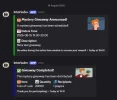
Outputs announcement messages both in game as well as into specified discord channel.

Discord Chat Bot/Discord Admin Commands Bot - $50
Two way comunication between in-game chat and discord chat, communicate with your players without logging in and let them read in game chat via discord. Additionaly bot integrations allows to run GM Commands via specified discord channels and specified discord user id. In game messages appears as if they were sent by player, takes in discord server profile user name as input name for in-game chat.


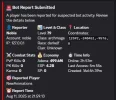
Bot Report with Discord Notifications- $10
Extension allowing players to run .report command that triggers captcha on targeted player and send detailed report to specified discord channel.
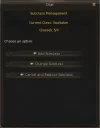
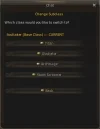
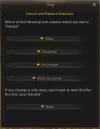
Subclass Command - $10
Allows players to run .sub command and opens up custom subclass management window, extension takes into account server configs for max subclass and show subclass list for classes.
Here's a list of all extension I did for my own use, selling individually. This is all done by me, and me only, exclusively for Lucera data pack. All have been tested on live server using latest Lucera rev. Payments via PayPal only to oasisl2server@gmail.com, firends and familly. Post your question in the thread. I will not provide support for setting up your own discord bots on the discord dev portal. I will only provide support to extensions in general, all of them are plug and play where you put *.ext.jar into gameserver folder and *.properties file into config folder and that's it, configuration files are commented as much as possible so you won't get lost.
READ AND ASK QUESTIONS IF NEEDED BEFORE PURCHASE, THERE WILL BE NO REFUNDS
These extensions were developed and are maintained specifically for the Lucera Classic Datapack and p166 Fafurion Client. Support is provided exclusively for these configurations, and purchases are made at your own discretion.
Chance Notify Extension - $10
Outputs system message for all chance based skills and debuffs. Config below:
Code:
# Chance Notify Extension Configuration
# =====================================
# Enable/disable the entire extension
ChanceNotifyEnabled = True
# Enable/disable specific notification types
NotifyDebuffChance = True
NotifySkillChance = True
# Only notify players (not NPCs/monsters)
NotifyOnlyPlayers = True
# Only notify for offensive skills
NotifyOnlyOffensiveSkills = True
# Message format settings
MessagePrefix = [+]
ShowBaseChance = False
ShowCalculatedChance = True
ShowSkillName = TrueEnhanced Boss Status - $25
Custom made .boss command (command can be specified according to your needs) with custom made %list% for better readability than stick Lucera .rb. Allows to view categorized raid bosses by level instead of one full list.
Code:
# Enhanced Raid Boss Status Extension Configuration
# ================================================

# Enable/Disable the enhanced raid boss status service
EnhancedRaidBossStatusEnable = true

# Number of bosses to display per page
EnhancedRaidBossStatusBossesPerPage = 20

# Level ranges for quick access buttons (6 ranges, 10 levels each)
EnhancedRaidBossStatusLevelRange1 = 20-30
EnhancedRaidBossStatusLevelRange2 = 31-40
EnhancedRaidBossStatusLevelRange3 = 41-50
EnhancedRaidBossStatusLevelRange4 = 51-60
EnhancedRaidBossStatusLevelRange5 = 61-70
EnhancedRaidBossStatusLevelRange6 = 71-80

# Voiced commands for accessing the service
EnhancedRaidBossStatusCommands = .boss,.rb

# Enable pagination
EnhancedRaidBossStatusEnablePagination = true


# Spacing configuration for boss list entries
# ==========================================

# Top spacing for first boss entry (in pixels) - prevents top clipping
EnhancedRaidBossStatusTopSpacing = 24

# Bottom spacing for last boss entry (in pixels) - prevents bottom clipping
EnhancedRaidBossStatusBottomSpacing = 24

# Spacing between boss entries (in pixels)
EnhancedRaidBossStatusEntrySpacing = 12Boss Announcement with Discord Notifications - $10
Outputs announcement messages both in game as well as into specified discord channel.
Code:
# Boss Announcement Extension Configuration
# ======================================

# Enable/disable the boss announcement extension
BossAnnouncementEnabled = True

# Discord Bot Configuration
# ========================
# Enable/disable Discord bot integration
DiscordBotEnabled = True

# Your Discord Bot Token (get from Discord Developer Portal)
# IMPORTANT: Replace this with a valid token from Discord Developer Portal
# Go to https://discord.com/developers/applications -> Your App -> Bot -> Reset Token
DiscordBotToken =

# Discord Channel ID for boss announcements (right-click channel -> Copy ID)
DiscordChannelBoss =

# Boss Filtering
# ==============
# Minimum boss level to announce (bosses below this level will be ignored)
MinBossLevel = 70

# Announcement Settings
# ====================
# Announce when boss is first attacked
AnnounceAttackStart = True


# Announce when boss is defeated
AnnounceDeath = True

# Output Settings
# ===============
# Enable in-game announcements
# Disable in-game announcements due to in-game announcements handdled by Giranforg extension
InGameAnnouncements = False

# Enable Discord announcements
DiscordAnnouncements = False

# Distance from RaidBoss where a player should receive the announcement
# If set to -1, the announcement will be shown to all players online
DistanceToAnnounce=-1

# Message prefix for announcements
MessagePrefix =

# Discord Embed Settings
# =====================
# Enable Discord embed messages (richer formatting)
EnableEmbedMessages = True

# Embed colors (hex format)
EmbedColorAttack = 0xFF6B35
EmbedColorDeath = 0xFF0000

# Advanced Settings
# ================
# Log level for debugging (DEBUG, INFO, WARN, ERROR)
LogLevel = INFO

# Example Configuration:
# ====================
# BossAnnouncementEnabled = True
# DiscordBotEnabled = True
# DiscordBotToken =
# DiscordChannelBoss =
# MinBossLevel = 75
# AnnounceAttackStart = True
# AnnounceDeath = True
# InGameAnnouncements = True
# DiscordAnnouncements = True
# MessagePrefix =
# EnableEmbedMessages = True
# EmbedColorAttack = 0xFF6B35
# EmbedColorDeath = 0xFF0000Discord Chat Bot/Discord Admin Commands Bot - $50
Two way comunication between in-game chat and discord chat, communicate with your players without logging in and let them read in game chat via discord. Additionaly bot integrations allows to run GM Commands via specified discord channels and specified discord user id. In game messages appears as if they were sent by player, takes in discord server profile user name as input name for in-game chat.
Code:
# Discord Bot Extension Configuration for L2J Oasis Server
# =============================================================

# Enable/disable the Discord bot extension
DiscordBotEnabled = True

# Discord Bot Token (get from Discord Developer Portal)
# https://discord.com/developers/applications
DiscordBotToken =

# =============================================================
# Discord Channel Configuration
# =============================================================
# How to get Channel IDs:
# 1. Enable Developer Mode in Discord (User Settings > Advanced > Developer Mode)
# 2. Right-click on a channel and select "Copy Channel ID"
# 3. Replace with your actual channel IDs

# Trade chat channel ID (for TRADE chat)
DiscordChannelTrade =

# Shout chat channel ID (for SHOUT chat)
# NOTE: All Discord messages will be sent to SHOUT in game
DiscordChannelShout =

# Hero chat channel ID (for HERO_VOICE chat)
DiscordChannelHero =

# Admin channel IDs (for GM commands and announcements)
# Format: comma-separated list of Discord channel IDs
# Example: DiscordChannelAdmin =
# You can add multiple channels separated by commas
DiscordChannelAdmin =

# =============================================================
# Channel Bridging Settings (Simplified)
# =============================================================
# Only these channels will be bridged from game to Discord
BridgeTradeChat = True
BridgeShoutChat = True
BridgeHeroChat = True

# All other channels are disabled
BridgeGeneralChat = False
BridgeWorldChat = False

# =============================================================
# Communication Settings
# =============================================================
# Enable Discord to game chat (all messages go to SHOUT channel)
EnableDiscordToGame = True

# Enable game to Discord chat (only TRADE/SHOUT/HERO)
EnableGameToDiscord = True

# Force all Discord messages to SHOUT channel in game
ForceDiscordToShout = True

# =============================================================
# Bot Settings
# =============================================================
# Command prefix for Discord bot commands
CommandPrefix = !

# Bot presence settings
BotStatus = Oasis Interlude+
BotActivity = WATCHING


# =============================================================
# Security & Filtering
# =============================================================
# Enable profanity filter
EnableProfanityFilter = True

# Maximum message length (characters)
MaxMessageLength = 500

# Rate limiting (messages per minute per Discord user)
RateLimitPerMinute = 10

# =============================================================
# Logging Settings
# =============================================================
# Enable logging of chat messages
LogChatMessages = True

# =============================================================
# Database Configuration for Item Lookup
# =============================================================
# Enable database item lookup for detailed item information
EnableItemDatabaseLookup = True

# Database connection settings
DatabaseHost = localhost
DatabaseName =
DatabaseUser = admin
DatabasePassword =
DatabasePort = 3306

# =============================================================
# NEW: Discord Command System Configuration
# =============================================================
# Enable the Discord command system (admin commands)
DiscordCommandSystemEnabled = True

# =============================================================
# Authorization Settings
# =============================================================
# Authorized Discord user IDs who can use admin commands
# Format: comma-separated list of Discord user IDs
# To get your Discord user ID: Enable Developer Mode, right-click your name, "Copy User ID"
# Leave empty to allow all users (NOT RECOMMENDED for production)
DiscordAuthorizedUsers =

# =============================================================
# Command Settings
# =============================================================
# Command cooldown in milliseconds (default: 1000ms = 1 second)
DiscordCommandCooldown = 1000

# Enable command logging
DiscordCommandLogging = True

# =============================================================
# Monitoring Settings
# =============================================================
# Enable system monitoring (CPU/Memory usage alerts)
DiscordMonitoringEnabled = True

# Memory usage threshold for alerts (percentage, default: 80%)
DiscordMemoryThreshold = 80

# CPU usage threshold for alerts (percentage, default: 80%)
DiscordCpuThreshold = 80

# Monitoring check interval in minutes (default: 5 minutes)
DiscordMonitoringInterval = 5

# =============================================================
# Debug Settings
# =============================================================
# Enable debug mode for command system
DiscordDebugMode = True

# Log all incoming Discord messages
DiscordLogAllMessages = False

# =============================================================
# Supported Channels (READ ONLY - DO NOT MODIFY)
# =============================================================
# FROM GAME TO DISCORD: TRADE, SHOUT, HERO_VOICE only
# FROM DISCORD TO GAME: All messages → SHOUT channel

# =============================================================
# NEW: Embed Image Configuration for Command Categories
# =============================================================
# Configure different embed images for different command categories
# These images will be displayed in Discord embeds when commands are executed

# =============================================================
# Bans/Punishments Category (kick, chatban, ban, jail commands)
# =============================================================
EmbedImageBansPunishments = https://i.imgur.com/6vrPymy.png

# =============================================================
# Maintenance Category (status, restart, shutdown commands)
# =============================================================
EmbedImageMaintenance = https://i.imgur.com/PHYQQsS.png

# =============================================================
# Player Management Category (give_all, give_item, setlevel commands)
# =============================================================
EmbedImagePlayerManagement = https://i.imgur.com/GNZkpqo.png

# =============================================================
# Server Info Category (help, online, uptime, version commands)
# =============================================================
EmbedImageServerInfo = https://i.imgur.com/LAsUKut.png

# =============================================================
# Moderation Category (announce, gm commands)
# =============================================================
EmbedImageModeration = https://i.imgur.com/XDbD4UT.png

# =============================================================
# Default Embed Image (fallback for uncategorized commands)
# =============================================================
EmbedImageDefault = https://i.imgur.com/KDuE4tj.png

# =============================================================
# Embed Configuration
# =============================================================
# Enable embed images in command responses
EnableEmbedImages = True

# Default embed color (hex format, e.g., #FF0000 for red)
DefaultEmbedColor = #0099FF

# Embed colors for different categories (hex format)
EmbedColorBansPunishments = #FF0000
EmbedColorMaintenance = #FFA500
EmbedColorPlayerManagement = #00FF00
EmbedColorServerInfo = #0099FF
EmbedColorModeration = #FFD700Bot Report with Discord Notifications- $10
Extension allowing players to run .report command that triggers captcha on targeted player and send detailed report to specified discord channel.
Code:
# Bot Report System Configuration
# Discord Webhook Settings
DiscordEnabled = true
DiscordWebhook =

# File Logging Settings
FileLoggingEnabled = true
LogFilePath = log/bot-reports.txt

# Report Cooldown (in seconds) - prevent spam
ReportCooldown = 300

# Maximum reports per player per day
MaxReportsPerDay = 10

# Enable detailed logging
VerboseLogging = true

# Captcha Integration Settings
# Enable captcha check when players are reported (works even if main bot check service is disabled)
CaptchaEnabled = true
# Maximum captcha checks per day for the same target player
CaptchaMaxPerTargetPerDay = 3
# Cooldown between captcha checks for the same target (in seconds)
CaptchaTargetCooldown = 1800

# Report Restrictions
# Minimum level required to use .report command
MinLevelToReport = 20
# Disable .report command in peace zones (cities, villages, etc.)
DisableReportInPeaceZones = trueSubclass Command - $10
Allows players to run .sub command and opens up custom subclass management window, extension takes into account server configs for max subclass and show subclass list for classes.
Code:
# Subclass Extension Configuration

# Enable/Disable the extension
Enabled = true

# Command to open subclass window (without the dot)
Command = sub

# Minimum level required to use the command
MinLevel = 1

# Allow usage in peace zones (cities, villages, etc.)
AllowInPeaceZones = true

# Allow usage during combat
AllowInCombat = false

# Allow usage during Olympiad
AllowInOlympiad = false

# Allow usage during Duel
AllowInDuel = false

# Enable detailed logging
VerboseLogging = true

# Custom messages
Message_NoPermission = You don't have permission to use this command.
Message_TooLowLevel = You must be at least level %d to use this command.
Message_InCombat = You cannot use this command while in combat.
Message_InOlympiad = You cannot use this command during Olympiad.
Message_InDuel = You cannot use this command during a duel.
Message_NotInPeaceZone = You can only use this command in peace zones.Attachments
Last edited:
