

How do I enable only the first option in PrimeShop?
My L2.ini
[PrimeShop]
UsePrimeShop=true
UseClassicPrimeShop=false
UseGoodsInventory=false
NewPrimeShop=true
My server.properties
PrimeShopEnabled = True
PrimeShopGamePointItemId = 57
PrimeShopEnableRewardCoinTab = False
PrimeShopSilverCoinItemId = 29983
PrimeShopGoldCoinItemId = 29984
PrimeShopVipEnabled = False
PrimeShopVipMaxLevel = 7
PrimeShopPurchasingAddVipPoints = True
PrimeShopPurchasingAddVipPointsCoefficient = 1.
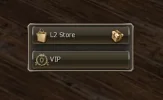
And yet the VIP section keeps appearing
My L2.ini
[PrimeShop]
UsePrimeShop=true
UseClassicPrimeShop=false
UseGoodsInventory=false
NewPrimeShop=true
My server.properties
PrimeShopEnabled = True
PrimeShopGamePointItemId = 57
PrimeShopEnableRewardCoinTab = False
PrimeShopSilverCoinItemId = 29983
PrimeShopGoldCoinItemId = 29984
PrimeShopVipEnabled = False
PrimeShopVipMaxLevel = 7
PrimeShopPurchasingAddVipPoints = True
PrimeShopPurchasingAddVipPointsCoefficient = 1.
And yet the VIP section keeps appearing

