
WARNING!!! DEFAULT LANGUAGE SETTINGS ARE NO LONGER IN Config: gameserver/config/languages.xml
Two languages are set by default.
English and Russian.
Now, as an example, we are adding Spanish.
2) Next, we need to create a folder for dialogs in gameserver/data/ in our case, html-es, because the short name for the language is shortName="es", and place your content in it.
3) Next, we need to create the localization file gameserver/data/strings/strings_es.properties, since the short name for the language is shortName="es".
4) Now we need to add a chat command to change the language, specifically in gameserver/config/altsettings.properties, since the short name for the language is shortName="es".
Config:
AltCommandLang = en, ru, es
5) Next, you need to add language switching options to the gameserver\data\html-en\command\cfg.htm dialog. For example:
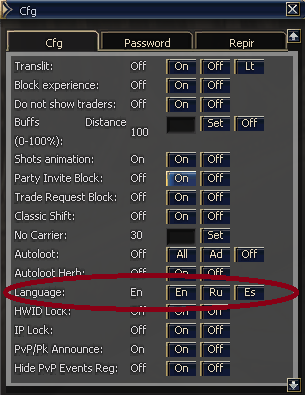
That's it! Congratulations, your language has been added!
Two languages are set by default.
Code:
<?xml version="1.0" encoding="UTF-8"?>
<!DOCTYPE list SYSTEM "languages.dtd">
<list>
    <language shortName="en" fullName="English" default="true"/>
    <language shortName="ru" fullName="Russian"/>
    <!-- Add new ones here, eg: <language shortName="es" fullName="Spanish"/> -->
    <!-- Add new ones here, eg: <language shortName="br" fullName="Brazilian"/> -->
</list>
English and Russian.
Now, as an example, we are adding Spanish.
Code:
<?xml version="1.0" encoding="UTF-8"?>
<!DOCTYPE list SYSTEM "languages.dtd">
<list>
    <language shortName="en" fullName="English" default="true"/>
    <language shortName="ru" fullName="Russian"/>
    <language shortName="es" fullName="Spanish"/>
</list>
2) Next, we need to create a folder for dialogs in gameserver/data/ in our case, html-es, because the short name for the language is shortName="es", and place your content in it.
3) Next, we need to create the localization file gameserver/data/strings/strings_es.properties, since the short name for the language is shortName="es".
4) Now we need to add a chat command to change the language, specifically in gameserver/config/altsettings.properties, since the short name for the language is shortName="es".
Config:
AltCommandLang = en, ru, es
5) Next, you need to add language switching options to the gameserver\data\html-en\command\cfg.htm dialog. For example:
Code:
<tr>
<td width=140>Language:</td>
<td width=30>%lang%</td>
<td width=30><button width=30 height=15 back="L2UI_CH3.bigbutton2_down" fore="L2UI_CH3.bigbutton2" action="bypass -h user_cfg lang en" value="En"></td>
<td width=30><button width=30 height=15 back="L2UI_CH3.bigbutton2_down" fore="L2UI_CH3.bigbutton2" action="bypass -h user_cfg lang ru" value="Ru"></td>
<td width=30><button width=30 height=15 back="L2UI_CH3.bigbutton2_down" fore="L2UI_CH3.bigbutton2" action="bypass -h user_cfg lang es" value="Es"></td>
<td width=30></td>
</tr>
That's it! Congratulations, your language has been added!
Last edited:


