How have anyone configured the Edge Network Firewall in the OVH panel? Has anyone tried it before? how`s setup this? i want to know thank you

You are using an out of date browser. It may not display this or other websites correctly.
You should upgrade or use an alternative browser.
You should upgrade or use an alternative browser.
Resolved I would like to ask those who are using OVH dedicated servers.
- Thread starter justin3ryu
- Start date


How have anyone configured the Edge Network Firewall in the OVH panel? Has anyone tried it before? how`s setup this? i want to know thank you
Some explanation here: https://maxcheaters.com/topic/247645-the-linux-series-part-3/
before i did, i couldnt log in into game i will show you what i did on mine . here Souce IP is my PC IPSome explanation here: https://maxcheaters.com/topic/247645-the-linux-series-part-3/
Attachments
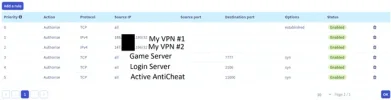
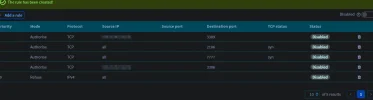
You're missing rule 0 all tcp established.before i did, i couldnt log in into game i will show you what i did on mine . here Souce IP is my PC IP
tell me how to set up.You're missing rule 0 all tcp established.
Priority Action Protocol Source IP Source port Destination port options StatusYou're missing rule 0 all tcp established.
0 Authorise TCP established Enabled
1 Authorise IPv4 My VPS Ip? Enabled
2 Authorise IPv4 MY Home IP? Enabled
3 Authorise TCP 7777 SYN Enabled
4 Authorise TCP 2106 SYN Enabled
5. Authorise TCP RDP port?? SYN Enabled
You're missing rule 0 all tcp established.
Attachments
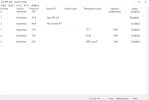
Maybe try specifying 2 ranges to cover all IPs instead of "all", I'm not sure how OVH allowed you to write "all":before i did, i couldnt log in into game i will show you what i did on mine . here Souce IP is my PC IP
0.0.0.0/1
128.0.0.0/1
Example setup with an anti-ddos proxy and all default ports. Let's assume everyone(players, website, outside scripts, etc.) will only use anti-ddos proxy IP to access the server with the exception you connecting from your home IP via RDP.
Anti-ddos proxy IP: 55.55.55.55
Your home IP: 90.90.90.90
OVH firewall setup will look like this:
| Action | Protocol | Source IP | Destination Port | Explanation |
| Authorise | TCP | 55.55.55.55 | 7777 | Default game server port |
| Authorise | TCP | 55.55.55.55 | 2106 | Default login server port |
| Authorise | TCP | 55.55.55.55 | 3306 | Default mysql port |
| Authorise | TCP | 90.90.90.90 | 3389 | Allowing your home IP access default RDP port(if you use Linux you need to open SSH port, default: 22) |
| Refuse | IPv4 | 0.0.0.0/1 | Blocks half of IPs range, set Priority to 19 | |
| Refuse | IPv4 | 128.0.0.0/1 | Blocks the other half, set Priority to 18 |
If you use some type of bot protection, you might need to open additional TCP port for your proxy IP, for example AAC default is 11000. So we'd need to add "Authorise TCP 55.55.55.55 11000".
Also always check which IPs to whitelist with your proxy provider, you might need to allow connections not from 1 source IP, but 2 or even more. Just repeat same rules for the IPs they provide.
Last edited:
안티 DDoS 프록시와 모든 기본 포트를 사용한 설정 예시입니다. 모든 사용자(플레이어, 웹사이트, 외부 스크립트 등)가 안티 DDoS 프록시 IP만 사용하여 서버에 접속한다고 가정해 보겠습니다. 단, RDP를 통해 홈 IP에서 접속하는 경우는 예외입니다.
안티-DDoS 프록시 IP: 55.55.55.55
귀하의 홈 IP: 90.90.90.90
OVH 방화벽 설정은 다음과 같습니다.
행동 규약 소스 IP 목적지 항구 설명 승인하다 TCP 55.55.55.55 7777 기본 게임 서버 포트 승인하다 TCP 55.55.55.55 2106 기본 로그인 서버 포트 승인하다 TCP 55.55.55.55 3306 기본 MySQL 포트 승인하다 TCP 90.90.90.90 3389 홈 IP 접속 기본 RDP 포트 허용(Linux를 사용하는 경우 SSH 포트를 열어야 함, 기본값: 22) 거절하다 IPv4 0.0.0.0/1 IP 범위의 절반을 차단하고 우선순위를 19로 설정합니다. 거절하다 IPv4 128.0.0.0/1 나머지 절반을 차단하고 우선순위를 18로 설정합니다.
봇 보호 기능을 사용하는 경우 프록시 IP에 대한 추가 TCP 포트를 열어야 할 수 있습니다. 예를 들어 AAC 기본값은 11000입니다. 따라서 "Authorise TCP 55.55.55.55 11000"을 추가해야 합니다.
프록시 제공업체에서 허용 목록에 추가할 IP를 항상 확인하세요. 하나의 소스 IP가 아닌 두 개 이상의 소스 IP에서 오는 연결을 허용해야 할 수도 있습니다. 제공업체에서 제공하는 IP에 대해서도 동일한 규칙을 반복하면 됩니다.
im not talking about AAC. Because I dont have AAC. and our server allows (Adrenaline Cracked Version). so, what i haveto make? im using RDP. Im still confused. Please make a the table like you show and how to set up.
If you don't use any kind of proxy and no protection. Then maybe try specifying 2 ranges to cover all IPs instead of "all", I'm not sure how OVH allowed you to write "all":im not talking about AAC. Because I dont have AAC. and our server allows (Adrenaline Cracked Version). so, what i haveto make? im using RDP. Im still confused. Please make a the table like you show and how to set up.
0.0.0.0/1
128.0.0.0/1

These rules should allow connection to login/game server, I'm not sure why it's not working. Also try selecting neither "syn", nor "established"(even though it should work with "syn")
do you using OVH?If you don't use any kind of proxy and no protection. Then maybe try specifying 2 ranges to cover all IPs instead of "all", I'm not sure how OVH allowed you to write "all":
0.0.0.0/1
128.0.0.0/1
Yesdo you using OVH?
i will send you message my friend
The source IP field should be left empty for ports 2106(SYN) and 7777 (SYN), as well as for the rule 0 TCP established rule.
You only apply source IP restrictions to sensitive services, such as the database port or other administrative/management ports, where you specifically want to limit access.
You only apply source IP restrictions to sensitive services, such as the database port or other administrative/management ports, where you specifically want to limit access.