

[RELEASE] InstanceShowTime — Visual Instance Timer on Screen | Lucera
━━━━━━━━━━━━━━━━━━━━━━━━━━━━━━━━━━━━━━━━━━━━━━━━━━━━━━━━━━━━
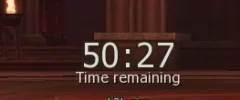
This plugin displays a visual countdown timer directly on the player's
screen when they enter a configured instance zone (Kamaloka, Rim Kamaloka,
or any other instanced zone of your choice).
It uses the official retail client packet ExSendUIEvent — the same timer
used on official servers — so no client modifications are required.
━━━━━━━━━━━━━━━━━━━━━━━━━━━━━━━━━━━━━━━━━━━━━━━━━━━━━━━━━━━━
FEATURES
━━━━━━━━━━━━━━━━━━━━━━━━━━━━━━━━━━━━━━━━━━━━━━━━━━━━━━━━━━━━
- Countdown timer shown on screen when entering a configured instance
- Timer reads the time limit directly from the instance zone XML (no hardcoding)
- Timer is automatically hidden when the player leaves the instance
- Works on login and on teleport — covers all entry scenarios
- Configurable list of instance zone IDs (show only where you want)
- Configurable delay before showing the timer (avoids overlap with teleport screen)
- Fully enable/disable via config — no recompile needed
- Uses ExSendUIEvent — official client packet, zero client-side changes
━━━━━━━━━━━━━━━━━━━━━━━━━━━━━━━━━━━━━━━━━━━━━━━━━━━━━━━━━━━━
INSTALLATION
━━━━━━━━━━━━━━━━━━━━━━━━━━━━━━━━━━━━━━━━━━━━━━━━━━━━━━━━━━━━
Step 1 — Place the plugin file:
Copy InstanceShowTime.ext.jar into your gameserver root folder.
gameserver/
└── InstanceShowTime.ext.jar ← here
Step 2 — Place the config file:
Copy InstanceTimeUI.properties into:
gameserver/
└── config/
└── custom/
└── InstanceTimeUI.properties ← here
If the folder config/custom/ does not exist, create it.
Step 3 — Start the server.
The plugin loads automatically on startup. Check the server log for:
[HH:mm:ss] InstanceTimeConfigLoader: Config loaded: ENABLED=true, INSTANCE_IDS=[72, 811], ...
━━━━━━━━━━━━━━━━━━━━━━━━━━━━━━━━━━━━━━━━━━━━━━━━━━━━━━━━━━━━
CONFIGURATION — InstanceTimeUI.properties
━━━━━━━━━━━━━━━━━━━━━━━━━━━━━━━━━━━━━━━━━━━━━━━━━━━━━━━━━━━━
━━━━━━━━━━━━━━━━━━━━━━━━━━━━━━━━━━━━━━━━━━━━━━━━━━━━━━━━━━━━
CONFIGURATION OPTIONS — REFERENCE TABLE
━━━━━━━━━━━━━━━━━━━━━━━━━━━━━━━━━━━━━━━━━━━━━━━━━━━━━━━━━━━━
━━━━━━━━━━━━━━━━━━━━━━━━━━━━━━━━━━━━━━━━━━━━━━━━━━━━━━━━━━━━
HOW TO FIND INSTANCE ZONE IDs
━━━━━━━━━━━━━━━━━━━━━━━━━━━━━━━━━━━━━━━━━━━━━━━━━━━━━━━━━━━━
1. Navigate to your server's data/instances/ folder.
2. Open the XML file for the instance you want.
3. Look for the id attribute on the root element:
4. Add that number (72 in the example) to the INSTANCE_IDS list
in InstanceTimeUI.properties, separated by commas.
Example with multiple zones:
━━━━━━━━━━━━━━━━━━━━━━━━━━━━━━━━━━━━━━━━━━━━━━━━━━━━━━━━━━━━
HOW IT WORKS
━━━━━━━━━━━━━━━━━━━━━━━━━━━━━━━━━━━━━━━━━━━━━━━━━━━━━━━━━━━━
On server startup:
The plugin registers a global listener that watches all player
login and teleport events across the entire server.
When a player enters an instance zone:
1. The plugin checks if that zone ID is present in INSTANCE_IDS.
2. After the configured UI_DELAY_MS delay, it reads the timelimit
from the instance zone XML (in minutes) and converts to seconds.
3. The timer packet is sent to the player and a countdown appears
on their screen.
When a player leaves the instance:
The plugin immediately sends a hide packet, removing the timer
from the player's screen as soon as they teleport out.
Config reload:
The configuration is also reloaded automatically when the server
triggers a script reload — no restart required to apply changes.
Important:
The timer displayed is visual only. It does NOT enforce the time
limit — that is handled by the server's existing instance system.
If the timelimit in the zone XML is 0 or not set, no timer will
appear even if the zone ID is listed in INSTANCE_IDS.
━━━━━━━━━━━━━━━━━━━━━━━━━━━━━━━━━━━━━━━━━━━━━━━━━━━━━━━━━━━━
SERVER LOG MESSAGES
━━━━━━━━━━━━━━━━━━━━━━━━━━━━━━━━━━━━━━━━━━━━━━━━━━━━━━━━━━━━
On successful load:
[HH:mm:ss] InstanceTimeConfigLoader: Config loaded: ENABLED=true,
INSTANCE_IDS=[72, 811], UI_EVENT_ID=142, UI_DELAY_MS=3000
If the config file is missing:
[HH:mm:ss] InstanceTimeConfigLoader: ERROR - Config file
.../config/custom/InstanceTimeUI.properties not found, using defaults
If an invalid ID is found in INSTANCE_IDS:
[HH:mm:ss] InstanceTimeConfigLoader: WARN - Invalid ID format in INSTANCE_IDS: <value>
If INSTANCE_IDS ends up empty after parsing:
[HH:mm:ss] InstanceTimeConfigLoader: WARN - INSTANCE_IDS is empty, adding default 72
━━━━━━━━━━━━━━━━━━━━━━━━━━━━━━━━━━━━━━━━━━━━━━━━━━━━━━━━━━━━
NOTES
━━━━━━━━━━━━━━━━━━━━━━━━━━━━━━━━━━━━━━━━━━━━━━━━━━━━━━━━━━━━
- No client modifications required. The timer uses the official
retail ExSendUIEvent client packet.
- If the timer appears before the screen finishes loading after
teleport, increase UI_DELAY_MS (e.g. from 3000 to 5000).
- The plugin works for any instance zone on LucerA2 — not limited
to Kamaloka. Just add the zone IDs to INSTANCE_IDS.
- If the config file is missing, the plugin starts with default
values: ENABLED=true, INSTANCE_IDS=[72, 811], UI_EVENT_ID=142,
UI_DELAY_MS=3000.
━━━━━━━━━━━━━━━━━━━━━━━━━━━━━━━━━━━━━━━━━━━━━━━━━━━━━━━━━━━━
━━━━━━━━━━━━━━━━━━━━━━━━━━━━━━━━━━━━━━━━━━━━━━━━━━━━━━━━━━━━
This plugin displays a visual countdown timer directly on the player's
screen when they enter a configured instance zone (Kamaloka, Rim Kamaloka,
or any other instanced zone of your choice).
It uses the official retail client packet ExSendUIEvent — the same timer
used on official servers — so no client modifications are required.
━━━━━━━━━━━━━━━━━━━━━━━━━━━━━━━━━━━━━━━━━━━━━━━━━━━━━━━━━━━━
FEATURES
━━━━━━━━━━━━━━━━━━━━━━━━━━━━━━━━━━━━━━━━━━━━━━━━━━━━━━━━━━━━
- Countdown timer shown on screen when entering a configured instance
- Timer reads the time limit directly from the instance zone XML (no hardcoding)
- Timer is automatically hidden when the player leaves the instance
- Works on login and on teleport — covers all entry scenarios
- Configurable list of instance zone IDs (show only where you want)
- Configurable delay before showing the timer (avoids overlap with teleport screen)
- Fully enable/disable via config — no recompile needed
- Uses ExSendUIEvent — official client packet, zero client-side changes
━━━━━━━━━━━━━━━━━━━━━━━━━━━━━━━━━━━━━━━━━━━━━━━━━━━━━━━━━━━━
INSTALLATION
━━━━━━━━━━━━━━━━━━━━━━━━━━━━━━━━━━━━━━━━━━━━━━━━━━━━━━━━━━━━
Step 1 — Place the plugin file:
Copy InstanceShowTime.ext.jar into your gameserver root folder.
gameserver/
└── InstanceShowTime.ext.jar ← here
Step 2 — Place the config file:
Copy InstanceTimeUI.properties into:
gameserver/
└── config/
└── custom/
└── InstanceTimeUI.properties ← here
If the folder config/custom/ does not exist, create it.
Step 3 — Start the server.
The plugin loads automatically on startup. Check the server log for:
[HH:mm:ss] InstanceTimeConfigLoader: Config loaded: ENABLED=true, INSTANCE_IDS=[72, 811], ...
━━━━━━━━━━━━━━━━━━━━━━━━━━━━━━━━━━━━━━━━━━━━━━━━━━━━━━━━━━━━
CONFIGURATION — InstanceTimeUI.properties
━━━━━━━━━━━━━━━━━━━━━━━━━━━━━━━━━━━━━━━━━━━━━━━━━━━━━━━━━━━━
Code:
# ─────────────────────────────────────────────
#  InstanceShowTime — Configuration
# ─────────────────────────────────────────────

# Enable or disable the entire plugin.
# true  = timer is shown in configured instances
# false = plugin is inactive, no timers are shown
ENABLED = true

# Comma-separated list of instanced zone IDs where the timer will be shown.
# To find a zone ID, open the instance XML in data/instances/ and check
# the id attribute on the root element.
# If this list is empty or invalid, the plugin falls back to ID 72.
INSTANCE_IDS = 72, 811

# UI Event ID sent with the timer packet.
# Default: 142 — do not change unless you know what you are doing.
UI_EVENT_ID = 142

# Message under timer
TIMER_LABEL = Remaining time

# Delay in milliseconds before the timer packet is sent after the player teleports.
# Increase this value if the timer appears before the screen finishes loading.
# Recommended: 3000 (3 seconds)
UI_DELAY_MS = 3000
━━━━━━━━━━━━━━━━━━━━━━━━━━━━━━━━━━━━━━━━━━━━━━━━━━━━━━━━━━━━
CONFIGURATION OPTIONS — REFERENCE TABLE
━━━━━━━━━━━━━━━━━━━━━━━━━━━━━━━━━━━━━━━━━━━━━━━━━━━━━━━━━━━━
| Option | Type | Default | Description |
| ENABLED | boolean | true | Enable or disable the plugin |
| INSTANCE_IDS | list | 72 | Zone IDs where the timer is displayed |
| TIMER_LABEL | string | Remaining time | Message under timer |
| UI_EVENT_ID | number | 142 | Event ID of the UI packet (advanced) |
| UI_DELAY_MS | number | 3000 | Delay (ms) before showing the timer after teleport |
HOW TO FIND INSTANCE ZONE IDs
━━━━━━━━━━━━━━━━━━━━━━━━━━━━━━━━━━━━━━━━━━━━━━━━━━━━━━━━━━━━
1. Navigate to your server's data/instances/ folder.
2. Open the XML file for the instance you want.
3. Look for the id attribute on the root element:
Code:
<instance id="72" name="Hall of the Abyss" timelimit="30">
    ...
</instance>
4. Add that number (72 in the example) to the INSTANCE_IDS list
in InstanceTimeUI.properties, separated by commas.
Example with multiple zones:
Code:
INSTANCE_IDS = 72, 811, 150, 200━━━━━━━━━━━━━━━━━━━━━━━━━━━━━━━━━━━━━━━━━━━━━━━━━━━━━━━━━━━━
HOW IT WORKS
━━━━━━━━━━━━━━━━━━━━━━━━━━━━━━━━━━━━━━━━━━━━━━━━━━━━━━━━━━━━
On server startup:
The plugin registers a global listener that watches all player
login and teleport events across the entire server.
When a player enters an instance zone:
1. The plugin checks if that zone ID is present in INSTANCE_IDS.
2. After the configured UI_DELAY_MS delay, it reads the timelimit
from the instance zone XML (in minutes) and converts to seconds.
3. The timer packet is sent to the player and a countdown appears
on their screen.
When a player leaves the instance:
The plugin immediately sends a hide packet, removing the timer
from the player's screen as soon as they teleport out.
Config reload:
The configuration is also reloaded automatically when the server
triggers a script reload — no restart required to apply changes.
Important:
The timer displayed is visual only. It does NOT enforce the time
limit — that is handled by the server's existing instance system.
If the timelimit in the zone XML is 0 or not set, no timer will
appear even if the zone ID is listed in INSTANCE_IDS.
━━━━━━━━━━━━━━━━━━━━━━━━━━━━━━━━━━━━━━━━━━━━━━━━━━━━━━━━━━━━
SERVER LOG MESSAGES
━━━━━━━━━━━━━━━━━━━━━━━━━━━━━━━━━━━━━━━━━━━━━━━━━━━━━━━━━━━━
On successful load:
[HH:mm:ss] InstanceTimeConfigLoader: Config loaded: ENABLED=true,
INSTANCE_IDS=[72, 811], UI_EVENT_ID=142, UI_DELAY_MS=3000
If the config file is missing:
[HH:mm:ss] InstanceTimeConfigLoader: ERROR - Config file
.../config/custom/InstanceTimeUI.properties not found, using defaults
If an invalid ID is found in INSTANCE_IDS:
[HH:mm:ss] InstanceTimeConfigLoader: WARN - Invalid ID format in INSTANCE_IDS: <value>
If INSTANCE_IDS ends up empty after parsing:
[HH:mm:ss] InstanceTimeConfigLoader: WARN - INSTANCE_IDS is empty, adding default 72
━━━━━━━━━━━━━━━━━━━━━━━━━━━━━━━━━━━━━━━━━━━━━━━━━━━━━━━━━━━━
NOTES
━━━━━━━━━━━━━━━━━━━━━━━━━━━━━━━━━━━━━━━━━━━━━━━━━━━━━━━━━━━━
- No client modifications required. The timer uses the official
retail ExSendUIEvent client packet.
- If the timer appears before the screen finishes loading after
teleport, increase UI_DELAY_MS (e.g. from 3000 to 5000).
- The plugin works for any instance zone on LucerA2 — not limited
to Kamaloka. Just add the zone IDs to INSTANCE_IDS.
- If the config file is missing, the plugin starts with default
values: ENABLED=true, INSTANCE_IDS=[72, 811], UI_EVENT_ID=142,
UI_DELAY_MS=3000.
━━━━━━━━━━━━━━━━━━━━━━━━━━━━━━━━━━━━━━━━━━━━━━━━━━━━━━━━━━━━
Attachments
Last edited:

