
UI problem with ExternalLogin & CmdLineLogin

gibbs

Heir
Customer
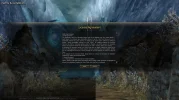
Folks, maybe some more experienced person is here and will be able to help me out, with setting in l2.ini ExternalLogin=true & CmdLineLogin=trueMy login screen looks like this - Bottom part if moved to the right side, with ExternalLoginfalse and CmdLineLogin on false - its all okay. How to fix this with those settings ' true ' , any1?

When i switch from full screen to window, or from window to full screen - It fixes, till i restart game.

1770240811797.webp
 
Do you only see this when the license rules are displayed?
If so, just disable them; you can find it in the build settings.
 
I found a issue, in ExternalLogin, UI loads diffrent for some reason. Interface calculate after lobbyscreen, i foundout that resize or change Full/Window force recalculating - fixing problem.

I Fixed it this way:

Interface.u (U need source and compiler)
  • LogInEula.uc

    New function


  • function FireResolutionChangedEvent()
    {
    local int w, h;
    local string p;

    GetCurrentResolution(w, h);
    ParamAdd(p, "NewWidth", String(w));
    ParamAdd(p, "NewHeight", String(h));
    ExecuteEvent(EV_ResolutionChanged, p);
    }

    And u call it after ELUA


  • ShowWindow();
    SendEula();
    FireResolutionChangedEvent();

This way, i force recalculate UI after client start in ExternalLogin mode, with proper UI.


Solved, fixed.
 
  • Like
Reactions: L2g
Back
Top