
You are using an out of date browser. It may not display this or other websites correctly.
You should upgrade or use an alternative browser.
You should upgrade or use an alternative browser.
Sell Custom extensions for lucera2 | HTML Design (NPC & CB)

You got me interested mate. Looking forward to buying this.Upcoming ... Kamaloka Instance + MAP Instance
STAGE: BETA
Configs
HTML:# --- Requirements --- RequiredLevel = 95 RequiredPvPKills = 500 RequiredPartySize = 2 # --- Instance Settings --- InstanceMaxRooms = 3 ReuseDelayHours = 24 InstanceMaxDurationMinutes = 120 MinimumTimeMinutes = 10 # --- Security --- HWIDCheck = false IPCheck = false # --- Locations --- TeleportXYZ = -10855 -185531 -10936 ReturnXYZ = -116043 45758 496;-116702 45178 352 # --- Monster Waves --- # Format: npcId,count,x,y,z (location optional, if not given -> spawn randomly in room) # You can also just use npcId,count and it will use default spawn locations. Wave1 = 50000,5,-10872,-185528,-10936 Wave2 = 50001,5,-12201,-185527,-10944 Wave3 = 50002,5,-14553,-185528,-10680 Wave4 = 50003,6,-16878,-185526,-10416 Wave5Boss = 50004,1,-20657,-185526,-9976
Features:
- You can see your current party size and minimum party size to enter
- You can see how free rooms have the instance
- You can see which players are inside in real time + with which wave they fight
- Special Feature: The monsters will multiply depending on the party members. For example if the party members are 3 the mobs will be 9 per wave. If the party members are 9 the mobs will be 27 per wave.
All this can be controlled via configs.
- Hud Notification when new wave is spawned
Preview


I hope to finish it till the end of the month. I will attach a video soon how everything works.You got me interested mate. Looking forward to buying this.
Full configuration kamaloka + map + geodata
YOU CAN BUY IT FROM HERE AUTOMATICALLY
THE KAMALOKA INSTANCE IS STANDALONE CODE.
Short DescriptionYOU CAN BUY IT FROM HERE AUTOMATICALLY
THE KAMALOKA INSTANCE IS STANDALONE CODE.
- Clean HTML lobby UI: status above the button (non-leader hint, leader cooldown in Hh:MMmin), room list with Leader + Wave.
- One-click start with strict validation: level, PvP, party size, distance, fee, personal cooldown.
- Targeted feedback: PM + HUD to leader and the offending player only (deduped if same person).
- Multi-room instances: parallel reflections with configurable max rooms.
- Wave system + Boss: configurable waves, spawn delay, boss per party size.
- Party-size scaling: caps and max mobs to keep fights balanced.
- Per-player rewards: each item rolls per player; item names from ItemHolder (not IDs).
- Rejoin grace: short window for DC’d players; safe return + per-player cooldowns.
- Optional IP/HWID protection: blocks duplicate IP/HWID inside the party.
How the Kamaloka instance work?
- Talk to the NPC → Lobby UI
You see party stats, free rooms, and a status line above the button (non-leader hint / leader cooldown in Hh:MMmin / “You can join now!”). - Leader clicks “Enter” → Validation
Checks run on every member: level, PvP, party size, distance to leader, personal cooldown, entry fee items, and (optional) IP/HWID uniqueness. - Clear feedback if something’s wrong
The leader and the offending player get a PM + HUD with the exact reason (deduped if it’s the leader themselves). No one else is pinged. - Room allocation & teleport
If a room is free, a reflection is created and the party is teleported to the instance spawn. - Waves → Boss
Waves spawn with a short delay; mob counts/boss scale by party size (within your caps). The room list shows ROOM#, Leader, and WAVE x/y / FINAL BOSS. - Victory & rewards
On boss kill/success, each reward entry is rolled per player; winners receive items (names from ItemHolder, not IDs). - Return & cooldowns
Party is sent to the configured return spots; each member gets a personal cooldown (shown to the leader in the lobby as Hh:MMmin). - Rejoin grace (optional)
If enabled, disconnected members can re-enter their own reflection for a short window; after expiry they’re evacuated safely. - Cleanup
The reflection closes; the room frees up for the next party.
- Ready ext.jar
- source code
- full html design
- All needed textures
- SQL files
- Instructions for installation
- Lifetime support to the code (do not apply if you change the code)
- MAP and GEODATA
Video Preview
# =========================================================
# Evo Instance Configuration
# =========================================================
# Custom Prefix
SysPrefix = System:
# --- Requirements ---
RequiredLevel = 80
RequiredPvPKills = 10
RequiredPartySize = 2
RequiredDistance = 500
# =========================
# Rejoin system
# =========================
RejoinEnabled = true
RejoinGraceMinutes = 5
RejoinSweepSeconds = 30
AutoReInviteHints = true
# --- Instance Settings ---
# How reflection rooms to have (like olympiad)
InstanceMaxRooms = 3
# How hours for the re-join
InstanceCooldownHours = 24
#The duration of the kamaloka instance
InstanceMaxDurationMinutes = 30
# Entry fee format: itemId,count;itemId,count
EvoInstanceFee = 57,100000
# --- Security ---
HWIDCheck = false
IPCheck = false
# --- Locations ---
#Where the party to be teleported. I added real coordinates to kamaloka(no need to change)
TeleportXYZ = -10855 -185531 -10936
#where the players to return (MUST CHANGE)
ReturnXYZ = -116043 45758 496;-116702 45178 352
# Where to send players if rejoin grace is expired (failsafe) - MUST CHANGE
DissconectXYZ = -116702 45178 352
# --- Monster Waves ---
# Format: npcId,count,x,y,z (location optional, if not given -> spawn randomly in room)
# You can also just use npcId,count and it will use default spawn locations.
# Change the monster ID's. The coordinates are set for the kamaloka instance.
Wave1 = 48290,5,-10872,-185528,-10936
Wave2 = 48290,5,-12201,-185527,-10944
Wave3 = 48291,5,-14553,-185528,-10680
Wave4 = 48291,5,-16878,-185526,-10416
Wave5Boss = 25657,1,-20657,-185526,-9976
# Delay before each wave/boss spawn (seconds)
MonsterSpawnTime = 5
# =====================================================
# Scaling system
# =====================================================
# Enable or disable scaling based on party size
ScalingEnabled = true
# Minimum party size required before scaling kicks in
ScalingMinParty = 2
# Maximum party size considered for scaling
ScalingMaxParty = 9
# Maximum multiplier mobs can scale to (e.g. 5.0 = triple mob counts at max party size)
ScalingMaxMultiplier = 5.0
# Maximum mobs allowed per spawn group after scaling (cap)
ScalingMaxMobs = 30
# How many seconds are needed to teleport back the players when they kill the boss
BossFinishCountdown = 15
# Boss IDs by party size (2–9 members). Depending on the party size it will spawn different boss.
# So make sure to create NPCs that will be RAIDS or MONSTERS and put the correct ID.
# Format: members:id;members:id
EvoInstanceBossIDs = 2:25657;3:25658;4:25659;5:25657;6:25657;7:25657;8:25657;9:25657
# ---------------------------
# Rewards
# Format: itemId,count,chance;itemId,count,chance
# Chance is in percent (0-100)
# Each player is rolled individually
# ---------------------------
EvoInstanceRewards = 57,100000,100;4037,2,80;
# Evo Instance Configuration
# =========================================================
# Custom Prefix
SysPrefix = System:
# --- Requirements ---
RequiredLevel = 80
RequiredPvPKills = 10
RequiredPartySize = 2
RequiredDistance = 500
# =========================
# Rejoin system
# =========================
RejoinEnabled = true
RejoinGraceMinutes = 5
RejoinSweepSeconds = 30
AutoReInviteHints = true
# --- Instance Settings ---
# How reflection rooms to have (like olympiad)
InstanceMaxRooms = 3
# How hours for the re-join
InstanceCooldownHours = 24
#The duration of the kamaloka instance
InstanceMaxDurationMinutes = 30
# Entry fee format: itemId,count;itemId,count
EvoInstanceFee = 57,100000
# --- Security ---
HWIDCheck = false
IPCheck = false
# --- Locations ---
#Where the party to be teleported. I added real coordinates to kamaloka(no need to change)
TeleportXYZ = -10855 -185531 -10936
#where the players to return (MUST CHANGE)
ReturnXYZ = -116043 45758 496;-116702 45178 352
# Where to send players if rejoin grace is expired (failsafe) - MUST CHANGE
DissconectXYZ = -116702 45178 352
# --- Monster Waves ---
# Format: npcId,count,x,y,z (location optional, if not given -> spawn randomly in room)
# You can also just use npcId,count and it will use default spawn locations.
# Change the monster ID's. The coordinates are set for the kamaloka instance.
Wave1 = 48290,5,-10872,-185528,-10936
Wave2 = 48290,5,-12201,-185527,-10944
Wave3 = 48291,5,-14553,-185528,-10680
Wave4 = 48291,5,-16878,-185526,-10416
Wave5Boss = 25657,1,-20657,-185526,-9976
# Delay before each wave/boss spawn (seconds)
MonsterSpawnTime = 5
# =====================================================
# Scaling system
# =====================================================
# Enable or disable scaling based on party size
ScalingEnabled = true
# Minimum party size required before scaling kicks in
ScalingMinParty = 2
# Maximum party size considered for scaling
ScalingMaxParty = 9
# Maximum multiplier mobs can scale to (e.g. 5.0 = triple mob counts at max party size)
ScalingMaxMultiplier = 5.0
# Maximum mobs allowed per spawn group after scaling (cap)
ScalingMaxMobs = 30
# How many seconds are needed to teleport back the players when they kill the boss
BossFinishCountdown = 15
# Boss IDs by party size (2–9 members). Depending on the party size it will spawn different boss.
# So make sure to create NPCs that will be RAIDS or MONSTERS and put the correct ID.
# Format: members:id;members:id
EvoInstanceBossIDs = 2:25657;3:25658;4:25659;5:25657;6:25657;7:25657;8:25657;9:25657
# ---------------------------
# Rewards
# Format: itemId,count,chance;itemId,count,chance
# Chance is in percent (0-100)
# Each player is rolled individually
# ---------------------------
EvoInstanceRewards = 57,100000,100;4037,2,80;
Last edited:
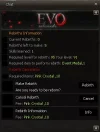
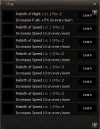
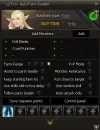
Enchant Scrolls Extension
Adding new feature to your current scrolls.
- Ability to reset your enchant by -1 or -2 and so on.
- Showing the next scroll enchant: Scroll Chance: XX% | Bonus XX% (Bonus if the player have premium)(when you enchant your item).
- No client edits. Message is sent to the player only (no global spam)
- CRYSTALIZE / RESET / NONE work exactly as in your core.
Configs
How to use?
Example
Preview: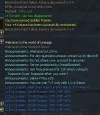
If you want to buy the code just DM me!
Adding new feature to your current scrolls.
- Ability to reset your enchant by -1 or -2 and so on.
- Showing the next scroll enchant: Scroll Chance: XX% | Bonus XX% (Bonus if the player have premium)(when you enchant your item).
- No client edits. Message is sent to the player only (no global spam)
- CRYSTALIZE / RESET / NONE work exactly as in your core.
Configs
Code:
enabled = true
#You can choose any scroll
scroll_ids = 729, 730, 731, 951
#Any prefix
prefix = System
# Choose chat channel: by ID or by name (name wins if both set)
# IDs: 1=HERO_VOICE, 2=TRADE, 3=CLAN, 4=SHOUT
chat_type_id = 1
# chat_type = HERO_VOICE
How to use?
Example
Code:
<scroll id="951" infallible="false" on_fail="RESET" reset_lvl="-1" chance_bonus="0" grade="C">Preview:
If you want to buy the code just DM me!
PvP Enchant Hour
Make pvp's to enchant your equipped items!
Admin Commands
Make pvp's to enchant your equipped items!
Admin Commands
Code:
//startpvp 30 >>starting the event for 30 minutes
//stoppvp >> stop the event
//pvpreload >> to reload the configs
- Active windows (DailyWindows)
Runs only during configured time windows (supports wrap past midnight). Auto-start/stop with global announcements. - Chance system (flexible)
- CurvesEnabled=true/false – turn per-level curves on/off.
- CurveAbsolute=true – curve values are absolute probabilities (e.g., 0.005 = 0.5%).
- CurveAbsolute=false – curve values are multipliers on base type chance.
- Happy End – last X minutes of a window multiply the final chance (HappyEndMultiplier). - Per-type base chance (when curves OFF)
- ChanceWeapon / ChanceArmor / ChanceJewelry are percent values used if CurvesEnabled=false.
- If curves ON + absolute mode, Chance* are ignored. - Per-level curves (when curves ON)
- Three curves: ChanceCurveWeapon/Armor/Jewelry.
- Format +level: value with floor lookup (uses the last threshold ≤ current enchant).
- Example (ABS): +0:1.0, +10:0.30, +15:0.10, +20:0.005. - Caps
- MaxEnchantWeapon/Armor/Jewelry override per type if ≥0.
- Else MaxEnchantGlobal if ≥0.
- Any cap < 0 ⇒ no cap for that scope. - Anti-abuse & anti-feed
- Blocks: same IP, HWID, party, clan, ally (each toggleable).
- Per-pair cooldown (directional A→B) in seconds.
- Per-pair max rolls per window (symmetric A↔B). - Item selection
- Picks one random equipped item from allowed slots (supports FULLARMOR & CHEST).
- Configurable via AllowedParts. - Player feedback
- PM to killer on success (template with %item%, %new%, %old%).
- Global announce on success with %player%, %item%, %new%. - Pre-start & Happy End announces
- Pre-start warnings at configured minute marks (PreStartMinutes).
- Optional Happy End broadcast when it begins. - Debug & logging
- Debug=true prints a trace for every guard and roll (who/why blocked, chance math, roll result).
- Successes logged to log/pvp_enchant.log with players, item, old/new level, location, happy flag. - Client updates
- On success: InventoryUpdate + broadcastUserInfo to reflect the new enchant immediately.
[*]# ===== PvP Enchant Hour by artemis37 =====
#Enable or disable the event
#You can start the event with gm command //startpvp minutes. For example //startpvp 30 (will start the event for 30 minutes)
#If you want to stop the event write //stoppvp
#If you want to reload the configs write //pvpreload
#If you want to set fixed time to start the event use DailyWindows
Enabled = true
#if any error pop in console. Enable debug and send to me!
Debug = false
# Криви: режим + master switch
#If true the stats will be read like 1.0=100% 0.005=0.5%
CurveAbsolute = true
#If false the chance will be direcly taken from ChanceWeapon, ChanceArmor, ChanceJewelry
CurvesEnabled = true
#When the event to start? You can choose multiply hours. Default hours: 22:00-23:00, 02:00-02:30
DailyWindows = 22:00-23:00, 02:00-02:30
#Anti abuse
#Limit by player IP
BlockSameIP = true
#Limit by player HWID
BlockSameHWID = true
#Limit same party
BlockSameParty = true
#Limit same clan
BlockSameClan = true
#Limit same ally
BlockSameAlly = true
#Anti feed system
#After A kills B, the system won’t even attempt an enchant roll for any further A → B kills until 120 seconds pass.
PairCooldownSeconds = 20
#Limit the attempts to enchant. 1 kill = 1 attempt (do not count succeed, it count kills) Default: 0. If enabled put number more than 50.
PairMaxRollsPerWindow = 0
#Allowed parts to enchant Default: WEAPON,HEAD,NECK,LEAR,REAR,LRING,RRING,CHEST,LEGS,GLOVES,FEET,SHIELD,FULLARMOR
AllowedParts = WEAPON,HEAD,NECK,LEAR,REAR,LRING,RRING,CHEST,LEGS,GLOVES,FEET,SHIELD,FULLARMOR
#Set fixed chance to weps/armors/jews. Use it only if CurvesEnabled=false
ChanceWeapon = 5.0
ChanceArmor = 3.0
ChanceJewelry = 2.0
# Stric chance 1.0=100%, 0.005=0.5%)
# Weps: 100% ≤+9, 30% ≥+10, 10% ≥+15, 0.5% ≥+20
ChanceCurveWeapon = +0:1.0,+10:0.30,+15:0.10,+20:0.005
# armor : 100% ≤+9, 20% ≥+10, 3% ≥+14, 0.5% ≥+18
ChanceCurveArmor = +0:1.0,+10:0.20,+14:0.03,+18:0.005
# jews: 100% ≤+9, 15% ≥+10, 2% ≥+14, 0.5% ≥+18
ChanceCurveJewelry = +0:1.0,+10:0.15,+14:0.02,+18:0.005
# Капове (-1 = без ограничение; ако глобалният е -1 и пер-тип е -1 -> напълно без кап)
#Use -1 for unlimited. If MaxEnchantGlobal = 20, It means weps/armors/jews max enchant is 25.
#If you want to change by type wep/armor/jews set MaxEnchantGlobal = -1 and set
#MaxEnchantWeapon = 16, MaxEnchantArmor = 12, MaxEnchantJewelry = 12(example)
MaxEnchantGlobal = 25
MaxEnchantWeapon = -1
MaxEnchantArmor = -1
MaxEnchantJewelry = -1
# Announce / PM / Pre-start / Happy End setup
#Announce the start event?
AnnounceStartStop = true
#Announce on success via global announcement?
AnnounceOnSuccess = true
#Announce message placeholder (can use any language like russian, korean, spanish) #please do not change the placeholders!
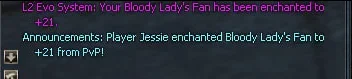
AnnounceSuccess = Player %player% enchanted %item% to +%new% from PvP!
#Do you want to send PM to the player when success?
PmOnSuccess = true
#PM Prefix
PmSender = L2 Evo System
#Pm text #please do not change the placeholders!
PmText = Your %item% has been enchanted to +%new%.
#Announce the event (upcoming)
PreStartEnabled = true
PreStartMinutes = 15,5,1
#please do not change the placeholders!
PreStartMsg = PvP Enchant starts in %m% min (%start%-%end%).
#Is happy end enabled?
HappyEndEnabled = true
#when the happy end will start?
HappyEndLastMinutes = 3
#multiply the chance by
HappyEndMultiplier = 1.5
#Should we announce the happy end? true/false
HappyEndAnnounce = true
#Happy End Message Please do not touch the placeholders %x% and %m%
HappyEndMsg = PvP Enchant Happy End! Chance ×%x% for the last %m% minutes.
Video Is coming soon ...

Attachments
Finally I manage to make the Anti KS System.
Full flexibility. You can setup it per mob id, all mobs, and by raid ID's.
You can turn on or off for raids.
Party management (can other party hit the mob true/false)
How it works?
Player A hit mob, Player B want to hit it as well but his damage is blocked and he get message "This monster is already taken by other player".
Anti Idiot system: If any of the players decide to use the system and to grab all monsters, the Anti Idiot system will prevent that. You have a config for how mobs you can take and after how seconds the mob can be hit again from player B.
The code will be released next week.
Preview (coming soon video)

Full flexibility. You can setup it per mob id, all mobs, and by raid ID's.
You can turn on or off for raids.
Party management (can other party hit the mob true/false)
How it works?
Player A hit mob, Player B want to hit it as well but his damage is blocked and he get message "This monster is already taken by other player".
Anti Idiot system: If any of the players decide to use the system and to grab all monsters, the Anti Idiot system will prevent that. You have a config for how mobs you can take and after how seconds the mob can be hit again from player B.
The code will be released next week.
Preview (coming soon video)
Would it also disallow to heal a mob, raid boss, epic by other parties ?Finally I manage to make the Anti KS System.
Full flexibility. You can setup it per mob id, all mobs, and by raid ID's.
You can turn on or off for raids.
Party management (can other party hit the mob true/false)
How it works?
Player A hit mob, Player B want to hit it as well but his damage is blocked and he get message "This monster is already taken by other player".
Anti Idiot system: If any of the players decide to use the system and to grab all monsters, the Anti Idiot system will prevent that. You have a config for how mobs you can take and after how seconds the mob can be hit again from player B.
The code will be released next week.
Preview (coming soon video)
View attachment 6934
I totally forgot about that ... Will be added.Would it also disallow to heal a mob, raid boss, epic by other parties ?

,
Last edited:
Where exactly can I enter the Use Code? I couldn't find it.20% Discount till 30.09.2025
Use Code: LUCERA20
It will apply to all codes in my shop + themes.
Well, I didn't find too. Ko-Fi make this very hard to do ... You can use this link to directly apply a discount.Where exactly can I enter the Use Code? I couldn't find it.
Buy From Here
Enchant Scrolls Extension added in the shop. 2 Versions available with configs and without configs. Buy Version 1, Buy Version 2
Added Auto Augment System - FREE DOWNLOAD

Отлично, добавь вывод в окно подтверждения информацию о пойманном ЛС в оружиеAdded Auto Augment System - FREE DOWNLOAD
In the next revisions I will add this.Отлично, добавь вывод в окно подтверждения информацию о пойманном ЛС в оружие